AI Agent Automation Workflows in 2026 Best Powerful 5-Step Guide

If you have ever caught yourself sitting at your desk at 9:00 AM, staring at six open browser tabs, manually copying email data into a spreadsheet, you know the quiet frustration of repetitive digital work. For years, we were promised that software would save us time. Instead, it gave us more buttons to click and more tools to manage.
Things changed dramatically when large language models emerged. But typing prompts into ChatGPT or Claude one by one quickly gets exhausting. What if your tools could talk to each other, reason through complex tasks, and execute multi-step jobs without waiting for you to hit enter?
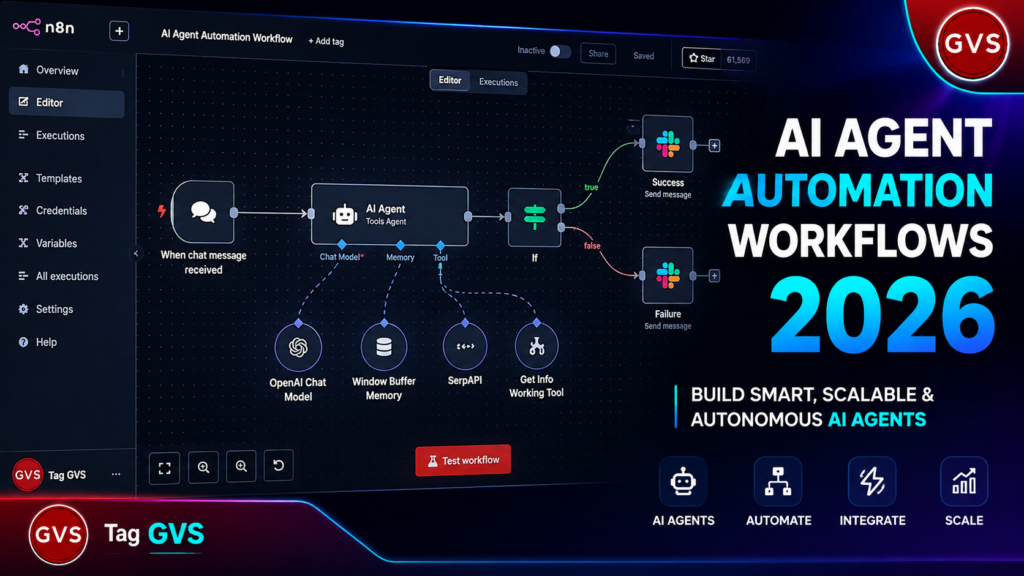
That is where AI agent automation workflows come into play. In 2026, building autonomous digital assistants is no longer reserved for machine learning engineers with computer science degrees. Thanks to open-source orchestration platforms and modern protocols like MCP (Model Context Protocol), anyone can design a custom AI system that runs reliably in the background.
In this guide, I will break down exactly how AI agent automation workflows function, why they outperform traditional bots, and how you can build your first autonomous system in five simple steps.
Table of Contents
- 1. What Are AI Agent Automation Workflows?
- 2. Traditional Automation vs. Autonomous AI Agents
- 3. The 2026 Tech Stack for AI Workflows
- 4. Step-by-Step: Building Your First AI Workflow
- 5. Real-World Case Study: Automated Content System
- 6. Governance: How to Prevent Error Loops
- 7. Popular AI Workflow Tools Compared
- 8. Frequently Asked Questions (FAQs)
- 9. Conclusion & Action Steps
1. What Are AI Agent Automation Workflows?
At its core, an AI agent automation workflow is a system where an artificial intelligence model acts as a decision-maker within a structured process. Unlike a static script that executes fixed commands, an AI agent can evaluate unstructured data, choose appropriate tools, handle edge cases, and dynamically decide the next best action.
Think of it as hiring a sharp virtual assistant. You do not tell them every single key to press. You give them a clear goal—such as “Filter inbound lead inquiries, research their company, and draft a tailored reply in Gmail”—and the agent handles the intermediate steps independently.
“The defining shift in 2026 is moving from static rule-based scripts to goal-driven agentic architectures that perceive, decide, and act across connected software ecosystems.”
2. Traditional Automation vs. Autonomous AI Agents
To understand why this shift matters, let us contrast traditional Robotic Process Automation (RPA) with modern agentic workflows.
Standard automation tools rely strictly on “If This, Then That” logic. If a customer fills out a web form, the system creates a row in Google Sheets. But what if the customer types their address in the phone number field? The traditional bot breaks or saves corrupted data.
An AI agent powered by an LLM recognizes the mistake immediately. It restructures the incoming text, places the address in the correct field, and adds a note flagging the correction. That contextual awareness makes AI agent automation workflows remarkably resilient.
3. The 2026 Tech Stack for AI Workflows
Building an autonomous system requires four essential building blocks:
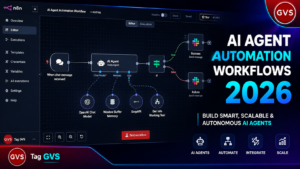
- Workflow Orchestrator: The visual canvas where logic nodes link together. Tools like n8n have become industry standards for self-hosted and cloud orchestration. To set up your own n8n server on PC for free, read our complete Step-by-Step Guide to Self-Hosting n8n with Docker on Windows.
- Reasoning LLM Engine: Models like Claude 3.7, GPT-5, or local open-weights models like Gemma 4 running via Ollama.
- Model Context Protocol (MCP): An open standard created by Anthropic that allows AI models to connect directly to external tools, databases, and APIs. To see how MCP connects to various IDEs, check out our guide on Google Antigravity MCP Setup.
- Data Endpoints: Your everyday business tools including WordPress, Gmail, Webhooks, Slack, and PostgreSQL.
4. Step-by-Step: Building Your First AI Workflow
Let us walk through the five practical steps required to build a fully functional AI agent workflow.
Step 1: Define the Event Trigger
Every automated chain begins with an event trigger. This could be a scheduled timer (e.g., every weekday at 8:00 AM), an incoming HTTP Webhook from a contact form, or a new RSS feed entry.
Step 2: Configure the AI Agent Node
In your orchestrator (such as n8n), add an AI Agent node. Set its role with a clear system prompt. For instance:
"You are a Senior Tech Editor. Your job is to analyze incoming news topics, check facts against web sources, and structure a concise summary."
Step 3: Attach MCP Tools & Capabilities
Give your AI agent “hands” to perform real actions. Connect tools for web search, database querying, or CMS publishing. If you want to connect Claude directly to WordPress, review our step-by-step guide on Connecting Claude AI to WordPress & YouTube Channel.
Step 4: Implement Structured Output Parsing
Raw text output from LLMs can be unpredictable. Enforce structured JSON schemas so the subsequent steps receive clean, well-formatted keys (e.g., title, body_html, target_keywords).
Step 5: Test, Refine, and Deploy
Run trial payloads through your pipeline. Test edge cases—like blank submissions or unusual language inputs—to confirm that error-handling logic catches unexpected responses gracefully.
5. Real-World Case Study: Automated Content System
Last month, I set out to solve a common bottleneck: keeping up with daily technology news updates without spending two hours every morning scanning forums and blogs.
I built an AI agent automation workflow that monitors technical RSS feeds, selects high-impact stories, conducts deep background research using web scrapers, and writes a draft directly inside WordPress. For multi-platform distribution, I paired this with our open-source workflow outlined in the Universal AI Studio Social Media Guide.
The result? Content research time dropped by over 70%, allowing my team to focus on hands-on testing and original analysis rather than manual curation.
6. Governance: How to Prevent Error Loops
Autonomous agents are powerful, but leaving them completely unsupervised can lead to unexpected failures. Here are three critical safety measures to implement:
- Human-in-the-Loop (HITL): Place an explicit approval step before high-stakes actions like sending customer emails or publishing live articles.
- Rate Limiting & Cost Caps: Set daily maximum execution limits on API keys to prevent recursive loops from generating unexpected bills.
- Fallback Routing: If an AI API experiences downtime, configure your workflow to fall back gracefully to a secondary model or send an admin alert.
7. Popular AI Workflow Tools Compared
Selecting the right platform depends on your technical comfort, budget, and hosting requirements.
If you want to set up n8n locally on your Windows PC with Docker and PostgreSQL, follow our comprehensive Self-Hosting n8n with Docker on Windows Tutorial.
| Tool Name | Hosting Model | Best For | AI Capabilities | Pricing Tier |
|---|---|---|---|---|
| n8n | Self-Hosted / Cloud | Technical Teams & Creators | Native AI Agents & MCP Support | Free Self-Hosted / Paid Cloud |
| Zapier | Cloud Only | Beginners & Quick Setup | AI Copilot & Zaps | Freemium / Subscription |
| Make.com | Cloud Only | Visual Branching Logic | Custom LLM Integrations | Freemium / Task-Based |
| Power Automate | Cloud / Enterprise | Microsoft 365 Ecosystem | Copilot Studio Agents | Per-User Licensing |
8. Frequently Asked Questions (FAQs)
Q1. Do I need coding experience to build AI agent automation workflows?
Answer: No. Modern platforms like n8n, Make, and Zapier offer visual drag-and-drop interfaces. Basic knowledge of webhooks and JSON formatting helps when configuring complex tasks, but writing traditional code is optional.
Q2. Is it safe to host automated AI workflows on my own server?
Answer: Yes, self-hosting platforms like n8n via Docker gives you full control over your data, API keys, and internal database records, keeping sensitive information private.
Q3. What is the difference between an API and MCP in AI workflows?
Answer: An API provides fixed endpoints for software communication. MCP (Model Context Protocol) is a standardized layer designed specifically for LLMs to inspect, query, and command tools dynamically without custom integration code for every tool.
Q4. How much does it cost to run autonomous AI agents daily?
Answer: If you self-host n8n and use open-source LLMs via Ollama, operational costs can be virtually zero. Using cloud LLM APIs (like OpenAI or Anthropic) typically costs pennies per execution depending on token volume.
9. Conclusion & Action Steps
The transition toward AI agent automation workflows marks a fundamental shift in personal productivity and business operations. By delegating repetitive research, data routing, and drafting tasks to intelligent agents, you free up valuable time to focus on strategy, creativity, and real human connection.
Start small: identify one repetitive task you perform every week, map out its steps, and build a single-agent workflow to handle it. You will be amazed at how quickly those saved minutes add up into extra hours every single week.