
Pinggy vs Ngrok (2026): The Ultimate Localhost Tunnel Showdown

Pinggy vs Ngrok (2026): The Ultimate Localhost Tunnel Showdown
Every web developer has lived through this exact nightmare. You are fifteen minutes away from a critical demo with a high-profile client. Your local backend on localhost:3000 is finally humming without errors. You open your terminal to spin up a quick tunnel so the client can preview the responsive UI on their smartphone, and boom: you are greeted by an unauthenticated session block, or worse, your client texts you asking why your link looks like a dangerous phishing scam with a giant warning interstitial.
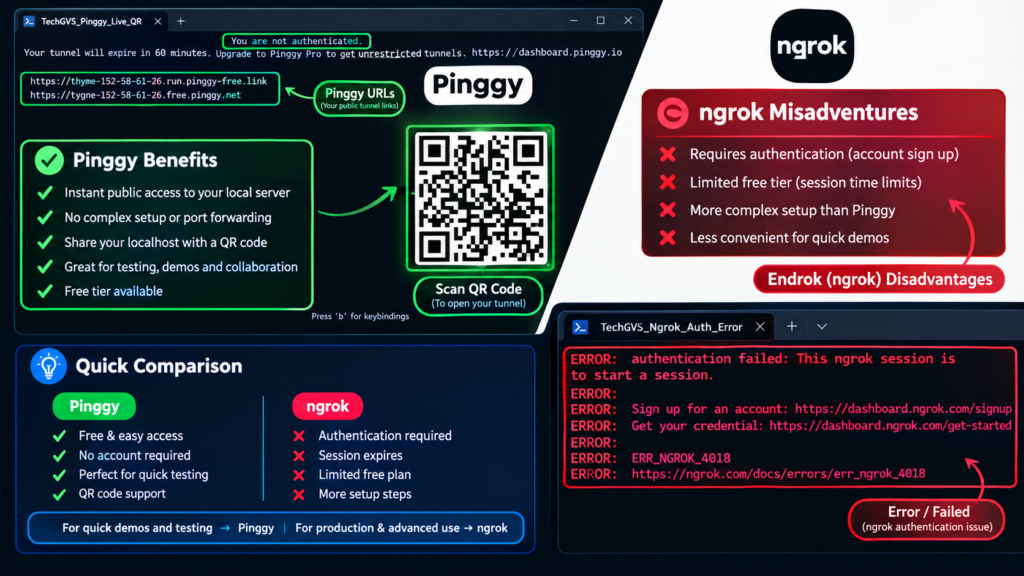
For more than a decade, Ngrok has been the undisputed default answer whenever developers needed a reliable localhost tunnel. However, as Ngrok transitioned toward heavy enterprise API gateway security with mandatory account tokens, device limits, and intrusive browser warning banners on free tiers, developers started actively searching for a seamless ngrok alternative.
Enter Pinggy: a zero-installation, zero-signup tunneling utility that works over your operating system’s native SSH client. In this exhaustive 2026 technical breakdown, we test Pinggy vs Ngrok live on Windows 11, evaluate real setup friction, inspect webhook debugging workflows, and provide a definitive rubric on which tool deserves a spot in your developer arsenal.
📌 Table of Contents
- 1. The Problem with Modern Tunneling: Friction vs. Security
- 2. Pinggy vs Ngrok: The 2026 Feature Breakdown
- 3. Round 1: Installation & Setup Friction
- 4. Round 2: Mobile Testing & The Dreaded Warning Interstitial
- 5. Round 3: Protocol Support (HTTP, Raw TCP, and UDP)
- 6. Round 4: Webhook Debugging & Request Inspection
- 7. Round 5: Pricing, Bandwidth, and Session Stability
- 8. The Definitive 2026 Verdict: Which Tool Should You Pick?
- 9. Frequently Asked Questions (PAA)
1. The Problem with Modern Tunneling: Friction vs. Security
When you want to share localhost to internet, you fundamentally need three things: high transfer speed, rock-solid uptime, and zero friction. Historically, Ngrok provided this with a single binary. But with the rollout of Ngrok Agent v3, developers quickly noticed two substantial hurdles:
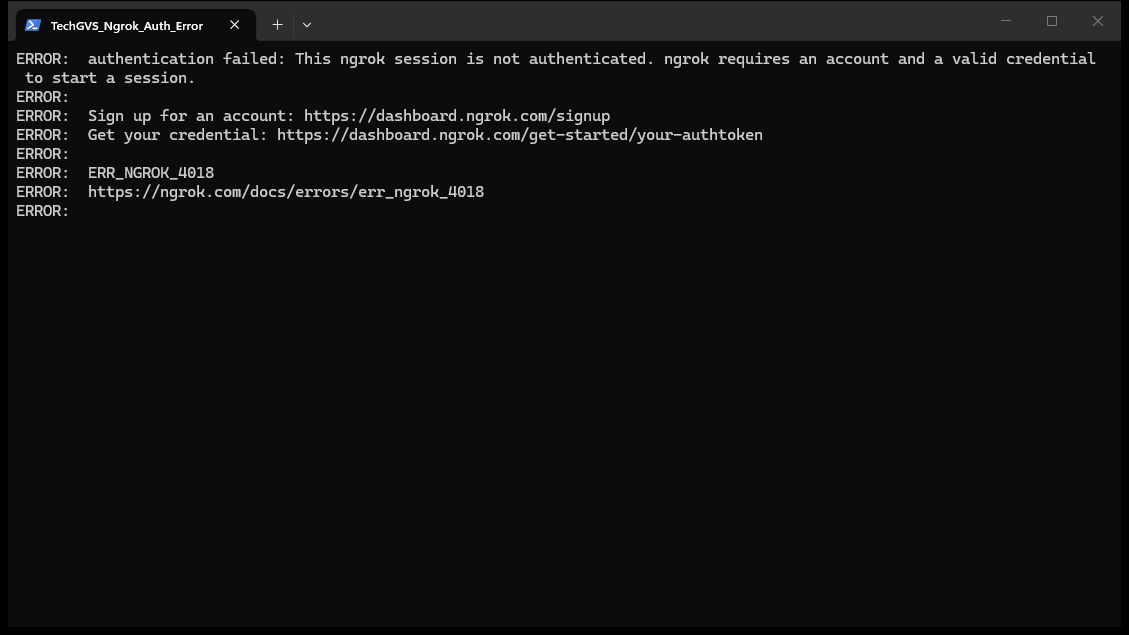
- Mandatory Authentication Tokens: You cannot run an ephemeral tunnel on a fresh workstation or a CI runner without first registering an account, generating an authtoken from a web dashboard, and running
ngrok config add-authtoken. Skip this step, and your command instantly crashes withERR_NGROK_4018. - The Browser Warning Interstitial: Every free Ngrok tunnel (using
ngrok-free.appdomains) presents a full-page anti-phishing interstitial screen to any human visitor using a browser. While this effectively deters bad actors, it creates immediate friction when sending a quick progress link to non-technical clients or testing mobile web view integrations.
These pain points fueled the rise of modern alternatives like Pinggy, which asks a radically simple question: Why install a proprietary client when every modern operating system already includes an enterprise-grade, encrypted tunneling client called OpenSSH?
2. Pinggy vs Ngrok: The 2026 Feature Breakdown
Before diving into individual benchmarks, let’s examine the raw architectural differences between both platforms side by side:
| Feature / Dimension | ⚡ Pinggy | 🥑 Ngrok (v3) | Developer Impact |
|---|---|---|---|
| Local Installation | None (Native OpenSSH) | CLI Binary / Package Manager | Pinggy requires zero disk footprint or binaries. |
| Account Registration | Optional (Instant Free Tunnel) | Mandatory (Authtoken required) | Pinggy launches in under 2 seconds without signup. |
| Terminal QR Code | Built-in Live QR | None | Instant mobile camera handoff with Pinggy. |
| Browser Interstitial Banner | None (Direct Instant Load) | Warning Screen on free tier | Pinggy looks 100% professional for client demos. |
| Protocol Support | HTTP, HTTPS, TCP, UDP, TLS | HTTP, HTTPS, TCP, TLS | Pinggy natively supports UDP (gaming, IoT, DNS). |
| Free Tier Bandwidth | 60 min / renewable sessions | 1 GB / month cap | Pinggy allows unlimited bandwidth during sessions. |
| Request Inspection GUI | Built-in (localhost:4300) | Built-in (localhost:4040) | Both provide rich visual webhook inspection. |
| Enterprise Identity / SSO | Basic Auth, IP Whitelisting | OIDC, SAML, Webhook Verification | Ngrok excels at enterprise access policies. |
| Pro Monthly Pricing | $3.00 / month | $10.00 / month | Pinggy delivers massive cost savings for solo devs. |
3. Round 1: Installation & Setup Friction
When measuring time-to-first-tunnel on a clean development machine, Pinggy obliterates traditional tooling. Because modern Windows 10/11, macOS, and virtually all Linux distributions ship with OpenSSH pre-installed, you do not need to download executables, run npm install -g, or configure environment paths.
To expose your local React, Next.js, or Django development server running on port 3000, you execute a single standard SSH reverse-port forwarding command:
# Expose localhost:3000 with a live terminal QR code
ssh -p 443 -R0:localhost:3000 qr@free.pinggy.io
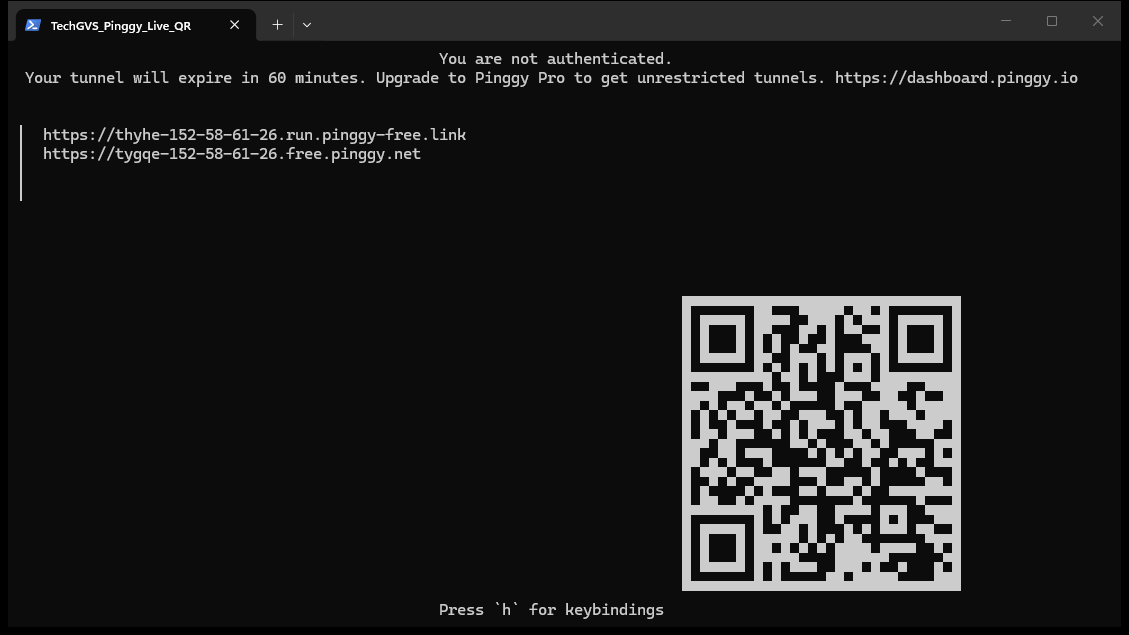
Within 1.8 seconds, Pinggy establishes an SSH reverse tunnel over standard HTTPS port 443 (which effortlessly bypasses corporate firewalls that block outbound port 22), generates a public Let’s Encrypt SSL link, and renders an interactive ASCII QR code directly inside your terminal.
By contrast, getting Ngrok running requires downloading a zip archive or running winget install ngrok, navigating to your web browser to sign in or create an account, navigating to the authtoken management screen, copying the cryptographic token, and running ngrok config add-authtoken <token> before you can type ngrok http 3000.
⚡ Winner on Setup Speed: Pinggy. Nothing beats zero installation and zero configuration when you need an immediate link.
4. Round 2: Mobile Testing & The Dreaded Warning Interstitial
One of the primary reasons full-stack developers need a localhost tunnel is responsive mobile testing. You want to see how your interactive navigation drawer, mobile camera upload, or touch gestures perform on actual iPhone and Android hardware.
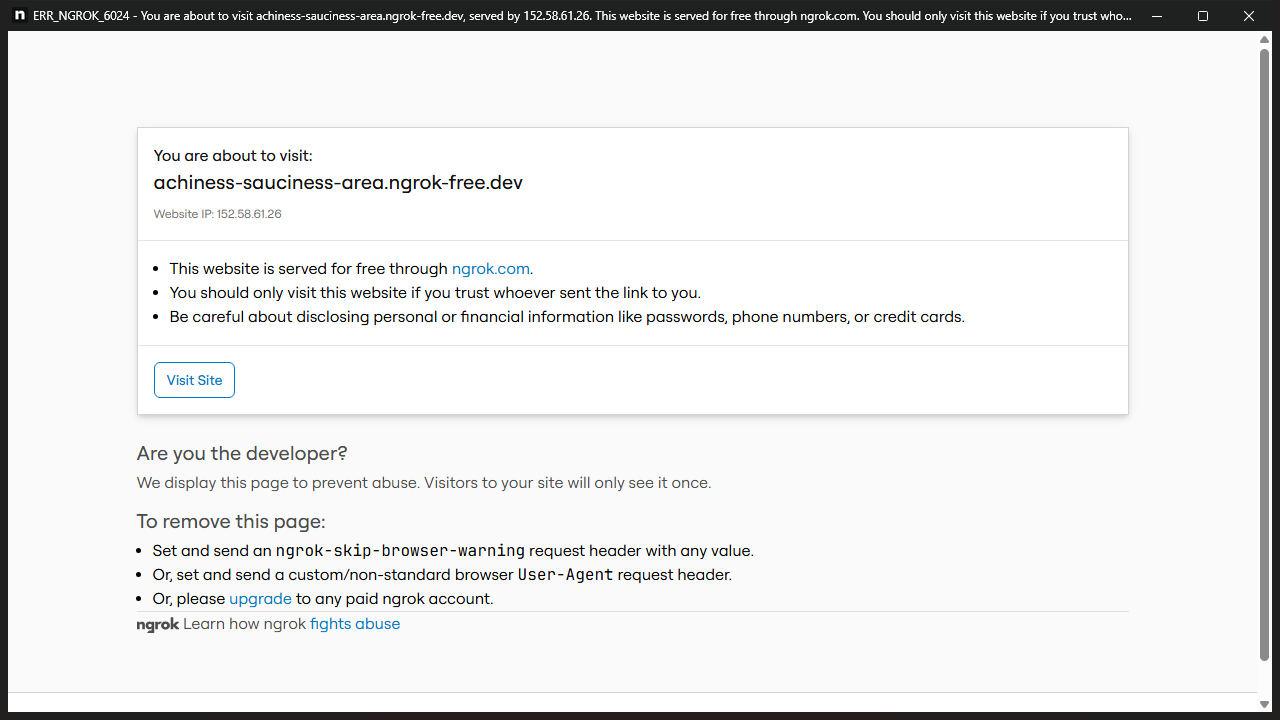
Here lies the biggest day-to-day frustration with Ngrok’s free tier. When you open a free ngrok-free.app URL in mobile Safari or Chrome, the browser is intercepted by a full-page warning interstitial informing the user that they are accessing an unverified free tunnel and requiring them to click “Visit Site”.
While developers understand what this means, non-technical clients, product managers, and beta testers frequently panic, thinking the link contains malware or a security vulnerability. Furthermore, if you are testing automated API redirects or mobile deep links, this HTML interstitial can completely break client-side routing.
With Pinggy, there is zero browser warning banner. When you scan the terminal QR code with your smartphone camera, your local web application opens immediately in your mobile browser with a valid Let’s Encrypt TLS certificate. For freelancers presenting client work, this clean presentation is invaluable.
⚡ Winner on Client Experience: Pinggy. Clean, instant loading without warning screens that scare clients.
5. Round 3: Protocol Support (HTTP, Raw TCP, and UDP)
Most basic tunneling utilities only forward HTTP and HTTPS traffic. However, real-world development often extends into database debugging, custom game servers, IoT telemetry, and media streaming.
While Ngrok supports raw TCP tunnels (allowing you to expose an SSH server or a local PostgreSQL database), its free and lower-tier plans do not support UDP tunneling. If you are developing a real-time multiplayer game in Godot or Unity, an interactive WebRTC voice service, or a DNS telemetry collector, Ngrok simply cannot forward your packets.
Pinggy provides comprehensive protocol flexibility out-of-the-box:
# 1. Expose Local PostgreSQL Database (Raw TCP)
ssh -p 443 -R0:localhost:5432 tcp@free.pinggy.io

# 2. Expose Real-Time Game Server / VoIP (UDP Tunneling)
ssh -p 443 -R0:localhost:9987 udp@free.pinggy.io

# 3. Password-Protect an Internal API Preview (Basic Auth)
ssh -p 443 -R0:localhost:3000 -t b:admin:SecretPass2026@free.pinggy.io
Because Pinggy multiplexes these connections over port 443, it can even forward TCP and UDP traffic through strict enterprise firewalls that block standard SSH port 22 or non-standard high ports.
💡 Pro Tip: If your company network blocks outbound port 22 SSH connections, Pinggy’s
-p 443 flag acts as a stealth tunnel because corporate proxies treat port 443 as encrypted HTTPS traffic.6. Round 4: Webhook Debugging & Request Inspection
When integrating third-party APIs like Stripe payments, GitHub Actions webhooks, or WhatsApp Cloud API messaging, you cannot just look at the console. You need to inspect incoming headers, check cryptographic signatures, review raw JSON payloads, and replay failed webhooks without completing a whole checkout flow again.
This is where Ngrok’s legendary Web Inspector at http://localhost:4040 shines:
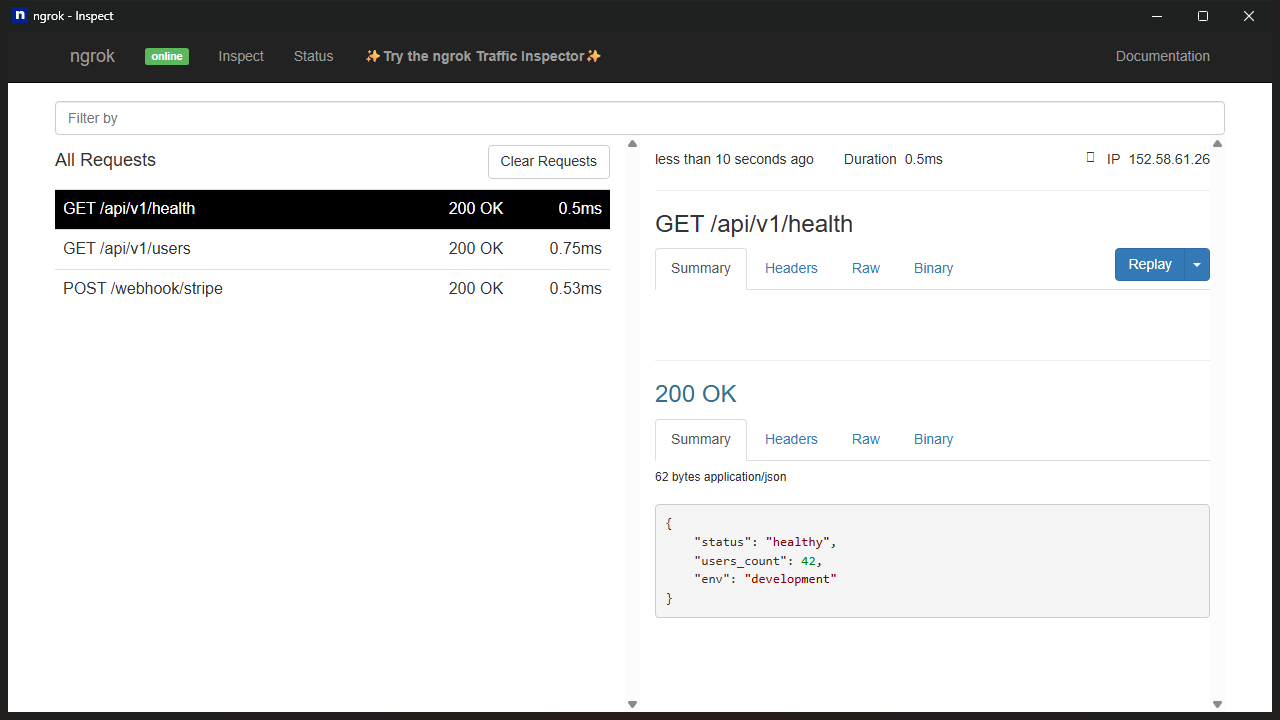
Ngrok’s dashboard allows you to click any incoming HTTP POST request, view formatted JSON, check timing latency, and hit the “Replay” button to re-send the exact payload to your local server. For debugging complex webhook handshakes, this feature has saved thousands of engineering hours.
Does Pinggy have an answer to this? Yes! By appending a local port forward flag, Pinggy launches its own lightweight local web debugger at http://localhost:4300:
# Launch Pinggy with local Web Traffic Debugger enabled
ssh -p 443 -R0:localhost:3000 -L 4300:localhost:4300 a@free.pinggy.io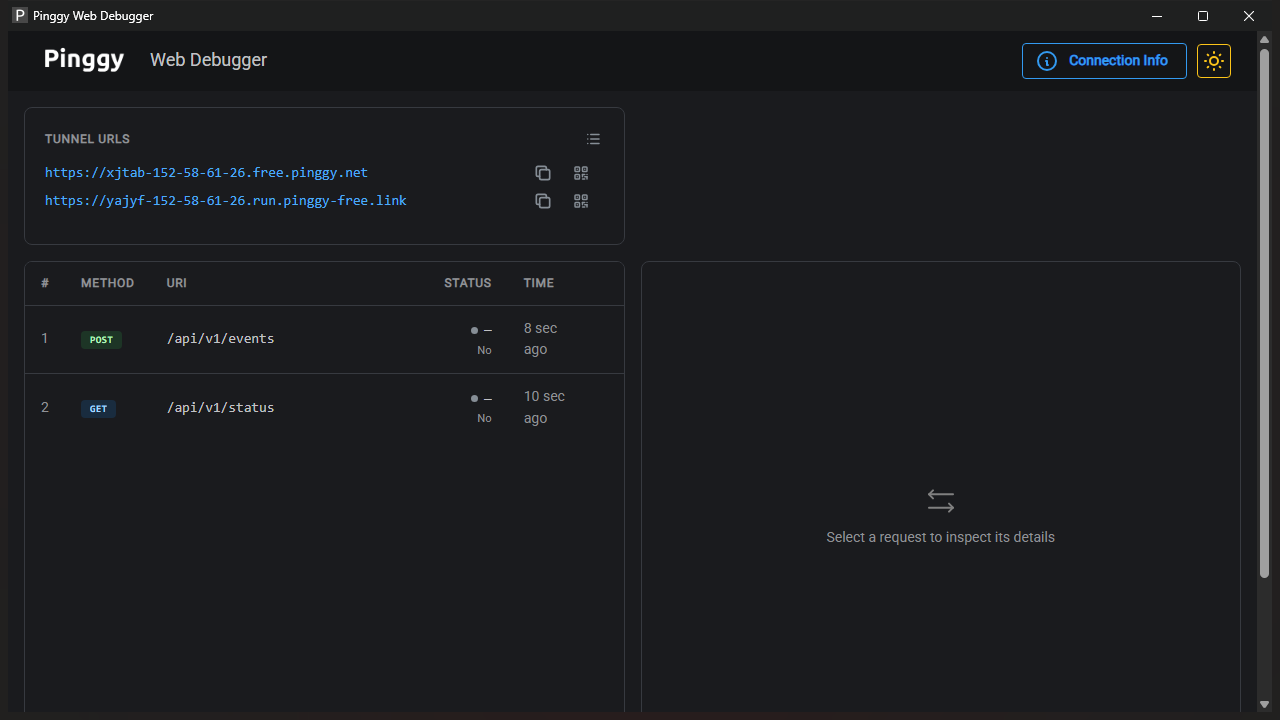
While Pinggy’s debugger is clean, responsive, and handles live payload inspection beautifully, Ngrok’s replay capabilities and advanced webhook signature validation still give it an edge for dedicated webhook engineers.
🥑 Winner on Webhook Debugging: Ngrok. The 1-click request replay and webhook signature verification ecosystem remains gold standard.
7. Round 5: Pricing, Bandwidth, and Session Stability
For independent developers and small software agencies, monthly subscription costs quickly accumulate. Let’s compare the financial and resource commitments of both platforms:
- Free Tier Limits:
- Ngrok: 1 static domain, 1 GB/month bandwidth limit, warning interstitial banner, mandatory authtoken.
- Pinggy: 60-minute session duration (renewable instantly by reconnecting), unlimited bandwidth during the session, zero warning banners, zero signup.
- Paid Tier Comparison:
- Pinggy Pro: At just $3.00/month, you unlock persistent custom domains (including apex/root domains like
api.yourdomain.com), wildcard subdomains, unlimited bandwidth, team members, and background daemon execution. - Ngrok Personal: Costs $10.00/month, caps bandwidth at 5 GB/month (with overage charges), and only allows custom subdomains (no apex domain support).
- Pinggy Pro: At just $3.00/month, you unlock persistent custom domains (including apex/root domains like
If you regularly transfer high-resolution media assets, stream local video feeds, or share large bundle builds, Ngrok’s strict bandwidth caps can halt your work unexpectedly. Pinggy’s unlimited bandwidth model offers peace of mind.
8. The Definitive 2026 Verdict: Which Tool Should You Pick?
After rigorous practical benchmarks on Windows 11, the verdict is remarkably clear:
⚡ Choose Pinggy If:
- You want to share localhost to internet in under 2 seconds without creating accounts or downloading software.
- You regularly present live web apps to clients and cannot afford scary interstitial warning banners.
- You test on real smartphones and want an instant terminal QR code for camera handoff.
- You need UDP tunneling for game engines, WebRTC audio, or IoT protocols.
- You want unlimited bandwidth and persistent custom domains at a fraction of the cost ($3/mo vs $10/mo).
🥑 Choose Ngrok If:
- You are building complex payment or messaging webhooks and require 1-click request replay capabilities.
- Your organization requires enterprise Single Sign-On (SAML, Okta, Azure AD) and edge security policies.
- You already have automated CI/CD pipelines deeply integrated with the Ngrok Agent v3 API.
For 90% of everyday web development workflows, client presentations, and mobile testing, Pinggy is the superior, friction-free ngrok alternative in 2026. It respects your time, your terminal, and your client’s user experience.
9. Frequently Asked Questions (PAA)
What is better than ngrok in 2026?
For instant development and client demos, Pinggy is better than Ngrok because it requires zero installation, works over native SSH, features live terminal QR codes, and removes the annoying browser warning banner. For permanent production homelabs, Cloudflare Tunnel is another excellent free alternative with unlimited bandwidth.
Does Pinggy require an account or signup?
No. You can immediately run ssh -p 443 -R0:localhost:3000 qr@free.pinggy.io without signing up or entering an email address. Free tunnels remain active for 60 minutes and can be renewed indefinitely simply by re-executing the command.
How do I bypass the ngrok browser warning screen?
On Ngrok’s free tier, human visitors using standard web browsers will always see the warning screen. You can bypass it programmatically in API requests by passing a custom HTTP header: ngrok-skip-browser-warning: true or setting a custom User-Agent header. However, for client-facing demos, switching to Pinggy is the cleanest solution because it has no warning banner.
Is Tailscale better than ngrok for local development?
Tailscale and Ngrok serve different purposes. Tailscale is a private VPN mesh designed to connect your own devices securely. Tailscale Funnel allows public access, but it requires installing the Tailscale client and setting up an account. Pinggy and Ngrok are much faster when you need to share a public link with third parties or clients who are not on your private network.
Can Pinggy bypass corporate firewalls?
Yes. Many enterprise and university Wi-Fi networks block outbound SSH connections on port 22. Pinggy operates over port 443 (the standard HTTPS port) or port 80, allowing your SSH reverse tunnel to seamlessly pass through firewalls and corporate proxy servers.
🚀 Level Up Your Developer Workflow with TechGVS
TechGVS Universal AI Studio brings you battle-tested developer tool reviews, open-source AI workflows, and deep productivity hacks. Stay ahead of the curve:
📢 Telegram: Join TechGVS on Telegram |
📺 YouTube: Subscribe @TechGVS07 |
💬 WhatsApp: Follow Official Channel