
Android 17 May Include a Native App Lock Feature for Enhanced Security

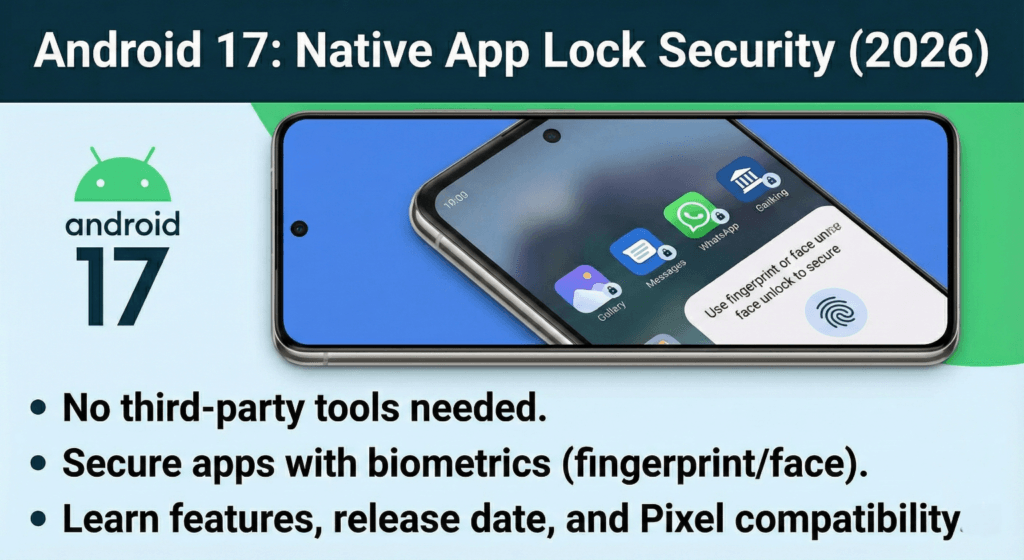
If you’re tired of downloading questionable third-party app lockers just to keep your private apps secure, I’ve got some exciting news for you. Google is finally—yes, finally—bringing native app lock functionality to Android 17. After years of Android users watching their iOS counterparts enjoy built-in app locking and OEM-specific solutions from Samsung, OnePlus, and Xiaomi, Pixel users and stock Android enthusiasts are about to get the privacy feature they’ve been desperately requesting.
Let me walk you through everything we know so far about this game-changing security upgrade coming in 2026.
Table of Contents
- What Is Android 17’s Native App Lock Feature?
- Why This Matters: The Current State of App Security on Android
- How Android 17’s Native App Lock Will Work
- Key Benefits of System-Level App Lock
- Android 17 App Lock vs Private Space: A Detailed Comparison
- When Will Android 17 App Lock Be Available?
- Which Devices Will Get Android 17 App Lock?
- What We Don’t Know Yet (And Why It Matters)
- Why Android Took So Long to Add This Feature
- How to Prepare for Android 17 App Lock
- Frequently Asked Questions (FAQs)
- Will Android 17 app lock work with third-party launchers?
- Can I still use Private Space after Android 17 introduces app lock?
- Will locked apps be hidden from the app drawer?
- What happens if I forget my PIN or my biometrics fail?
- Can I lock system apps like Settings or Play Store?
- Will app lock work on Android tablets and foldables?
- The Bigger Picture: Android 17’s Privacy Focus
- Final Thoughts: Why This Feature Matters
- What You Should Do Now
What Is Android 17’s Native App Lock Feature?
The Android 17 app lock is a system-level security feature that allows users to lock individual applications behind biometric authentication (fingerprint or face unlock) or a PIN/pattern. Unlike the current Private Space feature in Android 15, which creates an entirely separate user profile, the new app lock works directly within your main profile.
Think of it this way: you won’t need to install sketchy third-party apps anymore just to prevent your nosy friend from scrolling through your photo gallery when you hand them your phone. The lock mechanism will be baked right into Android’s core operating system, accessible through your default launcher.
How Was This Feature Discovered?
Android Authority’s Mishaal Rahman discovered compelling evidence of this feature in the Android Canary build 2512. Within the Android Framework package, developers found a new permission called LOCK_APPS and references to an App Lock API. Here’s what the code revealed:
- A new
SET_APP_LOCKintent action for triggering app locks - Dialog strings like “Lock [App Name]?” and “Remove App Lock from [App Name]?”
- Toast messages confirming when apps are successfully locked or unlocked
- Protection-level permissions restricted to system apps and launchers with HOME role
The LOCK_APPS permission is particularly significant because it’s restricted to internal and role-protected components. This means only your default launcher and system applications can access this functionality—ensuring a secure, controlled implementation.
Why This Matters: The Current State of App Security on Android
Let’s be honest—Android’s approach to app-level privacy has been frustrating for years. While Samsung Galaxy users have enjoyed native app lock features for ages, and Apple introduced a similar capability with iOS 18, pure Android and Pixel users have been left scrambling for alternatives.
The Private Space Problem
Google introduced Private Space with Android 15 as a security-focused solution, but it’s far from perfect for everyday use. When you move an app to Private Space:
- It runs in a completely separate user profile, isolated from your main system
- Apps cannot appear on your home screen—you must access them through the app drawer
- You can’t create shortcuts or widgets for Private Space apps
- File sharing between profiles is clunky and time-consuming
- Every single time you need to access a Private Space app, you must unlock the entire space
Private Space is excellent if you rarely need to access certain sensitive apps, but for daily-use applications like banking apps, messaging platforms, or your photo gallery? It quickly becomes a massive headache.
The Third-Party App Locker Nightmare
For years, Pixel users have relied on third-party app lockers available on the Play Store. Unfortunately, these solutions come with significant drawbacks:
Security Risks: Most third-party lockers require invasive permissions like Accessibility Service or Device Administrator access. These permissions grant apps the ability to monitor everything you do on your phone—creating a privacy paradox where you’re trusting an unknown developer with the keys to your entire digital life.
Easy Bypass: Many app lockers can be circumvented simply by uninstalling them or force-stopping them through Settings. Some attempt to prevent this by requesting Device Administrator privileges, but this creates even more security concerns.
Performance Impact: Third-party lockers typically work by continuously monitoring foreground apps and showing overlay lock screens. This constant background activity drains your battery and can cause performance lag.
Intrusive Advertising: Let’s not forget the ads. Many free app lockers bombard you with advertisements or push you toward premium subscriptions with questionable value propositions.
How Android 17’s Native App Lock Will Work
Based on the code discovered in Android Canary builds, here’s how the native app lock feature is expected to function:
The User Experience
According to leaked implementation details, the process will be beautifully simple:
- Long-press an app icon on your home screen or app drawer
- Select “Lock app” from the context menu (alongside existing options like App Info and Uninstall)
- Confirm your choice in a system dialog
- The app is now locked—attempting to open it will trigger a biometric prompt
When you try to launch a locked app, Android’s existing Biometric Prompt API will handle authentication. This means you’ll use the same fingerprint sensor, face unlock, or PIN/pattern that you already use to unlock your device. No learning curve, no separate passwords to remember—just seamless integration with your existing security setup.
Technical Implementation Details
For the tech-savvy readers, here’s what’s happening under the hood:
The launcher sends a SET_APP_LOCK intent to the system when you choose to lock an app. The Android OS then performs several validation checks:
- Verifies the requesting app has the HOME role (is your default launcher)
- Confirms the target app is a normal, user-facing application
- Checks that the app isn’t on a system-exempt list (critical system apps can’t be locked)
- Validates the device type—the feature is designed for phones and tablets only
Importantly, the code explicitly excludes Wear OS, Android TV, and Android Automotive from app lock functionality. The feature also won’t be available for supervised profiles, restricting it to the main device user.
Key Benefits of System-Level App Lock
1. Unmatched Security
Because the lock mechanism is integrated at the operating system level, it’s virtually impossible to bypass through simple workarounds. Unlike third-party solutions that can be uninstalled or disabled, the native app lock is permanent and protected by Android’s security framework.
2. Zero Privacy Compromise
You’re trusting Google—a company with a vested interest in Android security—rather than random third-party developers who may or may not have your best interests at heart. The system doesn’t need to monitor your every move or request sketchy permissions.
3. Minimal Performance Impact
Since the authentication check only occurs when you attempt to launch a locked app, there’s no continuous background monitoring. This means negligible battery drain and zero impact on system performance. The lock enforcement happens through a single system call rather than persistent process monitoring.
4. Seamless Integration
The app lock feature will integrate perfectly with Android’s existing biometric authentication infrastructure. Whether you use fingerprint, face unlock, or traditional PIN/pattern security, the experience will be consistent with how you already unlock your device.
5. Works Across All Launchers
Because the API is exposed to any launcher app with the HOME role, this feature will work whether you use Pixel Launcher, Nova Launcher, Microsoft Launcher, or any other third-party launcher. The implementation details may vary slightly, but the core functionality will be universal.
Android 17 App Lock vs Private Space: A Detailed Comparison
| Feature | Native App Lock (Android 17) | Private Space (Android 15) |
|---|---|---|
| Setup Complexity | One tap to lock individual apps | Must create separate profile and reinstall apps |
| Home Screen Access | Apps remain on home screen with normal icons | Apps hidden from home screen entirely |
| File Access | Apps access files in main profile normally | Complete isolation—difficult file sharing |
| Authentication | Per-app authentication when launched | Unlock entire space to access any app |
| Use Case | Daily-use apps requiring quick protection | Highly sensitive apps rarely accessed |
| Convenience | High—minimal friction | Low—multiple steps required |
| Security Level | Strong—system-level enforcement | Maximum—complete profile isolation |
The bottom line? Private Space is for maximum security with less frequent access, while App Lock is for convenient, everyday privacy protection. Most users will benefit far more from the native app lock feature for applications like WhatsApp, Instagram, banking apps, and photo galleries.
When Will Android 17 App Lock Be Available?
Here’s the challenging part—we’re still waiting. The feature is currently in early development stages within Android Canary builds, and importantly, the functionality flags are currently disabled. This means even developers testing Canary builds can’t actually use app lock yet; they can only see the groundwork being laid.
Expected Timeline
Late 2025: First Android 17 Developer Preview builds are expected to arrive in November 2025, following Google’s new accelerated release schedule.
Early 2026: Public Beta testing will likely begin in January or February 2026, available to Pixel 6 and newer devices enrolled in the Android Beta Program.
Mid-2026: The stable Android 17 release is projected for June 2026, approximately one year after Android 16’s June 2025 launch. This is when the native app lock feature should become available to all users.
Important caveat: Google isn’t expected to introduce new developer APIs in Android 16 QPR3 (the third quarterly platform release). Since app lock requires significant API changes, Android 17 is the earliest realistic target for this feature’s debut.
Which Devices Will Get Android 17 App Lock?
Google Pixel Devices
Thanks to Google’s promise of seven years of OS updates for recent flagships, the following Pixel devices should receive Android 17:
- Pixel 8, Pixel 8 Pro, Pixel 8a (launched 2023)
- Pixel 9 series (expected late 2025)
- Pixel 10 series (expected 2026)
- Possibly Pixel 7 series (2022) and Pixel 6 series (2021), depending on final support policies
Samsung Galaxy Devices
Exciting news for Samsung users: reports suggest that One UI 9 (based on Android 17) will globally implement the native app lock API. Samsung already tested a similar feature in Chinese One UI 8.5 builds through the Smart Manager app. With Android 17, Samsung can integrate the standard API while adding its own Knox security enhancements.
Expected Samsung devices include:
- Galaxy S23, S24, and S25 series (flagships get 4 OS updates)
- Galaxy Z Fold 5, Fold 6, and future foldables
- Galaxy Z Flip 5, Flip 6, and newer flip phones
- Select Galaxy A-series mid-range devices with longer update commitments
Other Android Manufacturers
OnePlus, Xiaomi, Vivo, OPPO, Motorola, and other Android OEMs will implement Android 17 with their custom skins throughout late 2026 and into 2027. Many of these manufacturers already offer proprietary app lock solutions (like HyperOS App Lock or OxygenOS App Locker), but the native Android 17 API provides a standardized, more secure foundation they can build upon.
What We Don’t Know Yet (And Why It Matters)
While the code revelations are exciting, several important questions remain unanswered:
Notification Handling
Will locked apps have their notifications redacted or hidden? This is crucial for privacy. Imagine locking your messaging app but still having full message previews appear on your lock screen—that defeats much of the purpose. iOS 18’s app lock feature intelligently hides notification content for locked apps, and Android 17 should ideally do the same.
Unfortunately, current code doesn’t show any notification modification logic, though Google could add this functionality before launch.
Recent Apps Screen Behavior
What happens when you view your recent apps? Will locked app previews be blurred or hidden? This is another potential privacy leak that needs addressing.
Granular Permission Controls
Will there be time-based locks? Can you set apps to automatically lock after a certain time period? Can you create “trusted locations” where apps remain unlocked (like your home Wi-Fi network)?
Multi-User and Work Profile Integration
How will app lock interact with Android’s existing multi-user system and Work Profile features? Will administrators be able to enforce app locks for managed devices?
These details will likely emerge as Android 17 development progresses through developer previews and beta testing.
Why Android Took So Long to Add This Feature
You might be wondering: why is Google only now adding a feature that third-party developers and OEM manufacturers have offered for years? It’s a fair question, and the answer involves Google’s philosophy around Android development.
Google has traditionally focused on providing platform-level building blocks rather than specific user-facing features. The company expected OEMs to differentiate their Android skins with features like app locking. This approach worked well for Samsung, OnePlus, and others but left stock Android and Pixel users behind.
Additionally, Google may have been concerned about the security implications. A poorly implemented system-level app lock could introduce vulnerabilities or create opportunities for malicious apps to abuse the feature. The company likely wanted to ensure any native solution met its high security standards.
With iOS 18 introducing similar functionality and user demand reaching critical mass, Google finally appears ready to tackle this challenge head-on.
How to Prepare for Android 17 App Lock
While you’ll need to wait until mid-2026 for the stable release, here’s how you can prepare:
For Regular Users
- Ensure your device is eligible: Check whether your phone will receive Android 17 based on your manufacturer’s update policy
- Consider joining the Beta Program: If you have a compatible Pixel device and want early access, consider enrolling in the Android Beta Program in early 2026
- Audit your current app locker: If you’re using a third-party app locker, review the permissions it requests and the data it can access. You might be surprised (and concerned) by what you find
- Identify which apps you’ll lock: Start thinking about which applications contain your most sensitive information—banking apps, photo galleries, messaging apps, social media, health apps, and password managers are common candidates
For Developers
- Monitor Android Canary builds: Keep an eye on Canary releases for updated app lock implementation details
- Plan for authentication flows: If you develop a launcher app, start planning how you’ll integrate the app lock UI into your existing long-press menus
- Consider app-specific features: Think about whether your app should have custom behavior when locked (like hiding recent notifications or redacting previews)
- Test on Developer Preview builds: Once Android 17 Developer Preview releases in late 2025, test your apps with the lock feature enabled
Frequently Asked Questions (FAQs)
Will Android 17 app lock work with third-party launchers?
Yes! The LOCK_APPS permission is available to any launcher that has the HOME role, meaning popular third-party launchers like Nova Launcher, Action Launcher, and Microsoft Launcher will be able to implement the feature. However, each launcher may present the UI slightly differently.
Can I still use Private Space after Android 17 introduces app lock?
Absolutely. Private Space and app lock serve different purposes and will coexist in Android 17. Use Private Space for maximum security and complete isolation, and use app lock for convenient daily protection of individual apps.
Will locked apps be hidden from the app drawer?
No. Unlike Private Space, which hides apps completely, the native app lock simply requires authentication to open apps. The icons will remain visible in your app drawer and on your home screen—they’ll just be protected behind biometric security or a PIN.
What happens if I forget my PIN or my biometrics fail?
The app lock feature uses Android’s standard Biometric Prompt API, which already has robust fallback mechanisms. If your fingerprint or face unlock fails, you’ll be prompted to use your device PIN or pattern—the same backup authentication method you use to unlock your phone.
Can I lock system apps like Settings or Play Store?
Most likely not. The code includes checks to ensure only normal user-facing apps can be locked. System-critical applications will presumably be on an exempt list to prevent users from accidentally locking themselves out of essential phone functions.
Will app lock work on Android tablets and foldables?
Yes! The feature is designed for handheld devices, which includes both smartphones and tablets. Foldable devices like the Galaxy Z Fold series and Pixel Fold should fully support app lock. However, Wear OS watches, Android TV, and Android Automotive are explicitly excluded.
The Bigger Picture: Android 17’s Privacy Focus
The native app lock feature doesn’t exist in isolation—it’s part of Android 17’s broader emphasis on user privacy and security. Other expected Android 17 features include:
- Granular contacts permissions: Apps will need to request access to specific contacts rather than your entire contact list
- Enhanced local network scanning alerts: You’ll receive notifications when apps scan your local network
- Improved on-device malware detection: Faster, more accurate threat scanning without relying on cloud services
- Desktop mode security: When using Android 17’s new desktop mode with external displays, locked apps will remain locked even in windowed mode
This holistic approach suggests Google is finally treating privacy as a core feature rather than an afterthought—a welcome change that brings Android more in line with iOS’s privacy-first reputation.
Final Thoughts: Why This Feature Matters
On the surface, adding a native app lock might seem like a minor convenience feature. But in reality, it represents something much more significant: Google acknowledging that privacy and convenience don’t have to be mutually exclusive.
For years, Android users have been forced to choose between trusting sketchy third-party apps, dealing with the cumbersome Private Space, or simply accepting that anyone with physical access to their unlocked phone could see everything. Android 17’s native app lock finally provides a sensible middle ground.
This feature is especially important in our increasingly digital lives where our phones contain everything from banking information to intimate photos to private messages. Having system-level protection that’s both secure and convenient isn’t a luxury—it’s a necessity.
The fact that Google is building this functionality directly into Android 17 rather than leaving it to third-party developers or OEMs shows a commitment to making privacy features accessible to all Android users, not just those with specific phone brands.
What You Should Do Now
If you’re excited about Android 17’s native app lock feature (and you should be), here’s what I recommend:
- Stay informed: Follow Android Authority, 9to5Google, and other reputable Android news sources for updates as Android 17 development progresses
- Share this information: Many Android users don’t realize this feature is coming—spread the word to friends and family who might benefit
- Provide feedback: Once Android 17 beta releases in early 2026, install it on a secondary device and provide feedback through Google’s official channels. User input during beta testing can significantly improve the final implementation
- Prepare your upgrade path: If your current device won’t receive Android 17, consider whether privacy features are important enough to influence your next phone purchase
The introduction of native app lock in Android 17 marks a turning point in Android’s privacy evolution. After years of playing catch-up with iOS and manufacturer-specific solutions, Google is finally delivering a feature that should have existed from day one.
While we’ll need to wait until mid-2026 for the stable release, the promise of simple, secure, system-level app locking is something worth celebrating. And for Pixel users especially, this long-awaited feature will be a game-changer that eliminates the need for workaround solutions and questionable third-party apps.
So mark your calendar for June 2026—Android privacy is about to get a major upgrade, and your most sensitive apps will finally have the protection they deserve. The question isn’t whether you’ll use this feature, but rather which apps you’ll lock first. For me? It’s definitely my photo gallery and banking apps—some things are just meant to stay private.
Are you excited about Android 17’s native app lock feature? Which apps will you lock first once the update arrives? Share your thoughts in the comments below, and don’t forget to bookmark this page for updates as we learn more about Android 17’s development throughout 2025 and 2026!