


What is DNS and How Does It Work?

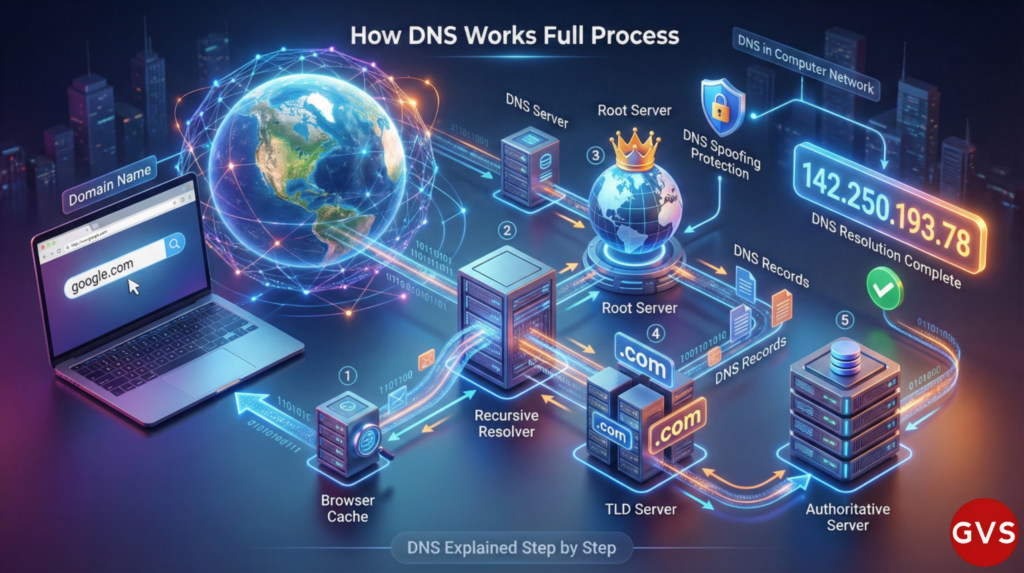
What is DNS and How Does It Work? The Complete Guide You Need in 2025
Have you ever wondered what happens in those few milliseconds between typing “google.com” and seeing the search engine appear on your screen? There’s an invisible hero working behind the scenes, making the internet as user-friendly as it is today. That hero is DNS – the Domain Name System.
I remember the first time I tried to explain what is DNS to my non-technical friend. She looked at me like I was speaking a foreign language. But when I compared it to her phone’s contact list, everything clicked instantly. Just like you don’t memorize phone numbers for every friend, you don’t need to memorize IP addresses for every website you visit.
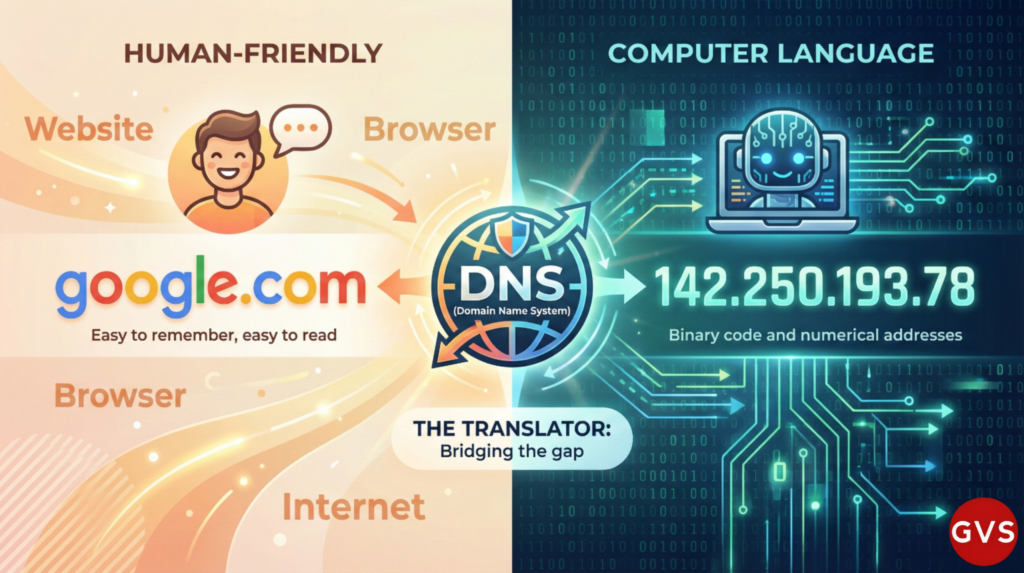
In this comprehensive guide, we’ll dive deep into understanding what is DNS server, what is DNS in computer network, and how this fascinating system powers the internet we rely on every single day.
Table of Contents
- What is DNS? Understanding the Basics
- What is a DNS Server and Its Types
- How Does DNS Work? Step-by-Step Process
- What are DNS Records? Complete Breakdown
- DNS in Computer Networks
- Understanding DNS Lookup Process
- What is DNS Resolver?
- DNS Resolution Explained
- DNS Security Threats: Spoofing & More
- The 4 Types of DNS Servers
- Can Internet Work Without DNS?
- How to Fix DNS Problems
- Frequently Asked Questions
What is DNS? Understanding the Basics
Let me tell you something that might surprise you: DNS stands for Domain Name System, and it’s essentially the phonebook of the internet. But unlike traditional phonebooks, DNS works at lightning speed, handling billions of queries every single day.
Think about it this way – when you want to visit Facebook, you simply type “facebook.com” into your browser. But here’s what’s really happening: your computer needs to know Facebook’s actual address, which is something like 157.240.195.35. Can you imagine memorizing hundreds of these numerical addresses for all the websites you visit daily? That’s exhausting just thinking about it!
This is precisely what DNS is – it’s the system that translates human-friendly domain names into computer-friendly IP addresses. Every time you click a link, send an email, or stream a video, DNS is working tirelessly in the background, making these connections possible.
Why DNS Matters in Today’s Digital World
I’ve been working with networks for over a decade, and I can confidently say that DNS in networking is one of the most critical yet underappreciated components of our digital infrastructure. Without it, the internet as we know it simply wouldn’t exist in its current user-friendly form.
According to recent studies from 2024, there are currently more than 342 million registered domains, and that number keeps growing. Can you imagine trying to maintain a single directory with all those entries? That’s why DNS uses a distributed, hierarchical system.
What is a DNS Server and Its Types
Now that you understand what DNS is, let’s talk about the machinery that makes it all work – DNS servers.
A DNS server is essentially a specialized computer that stores DNS records and responds to queries about domain names. Think of it as a librarian who knows exactly where every book is located in a massive, global library.
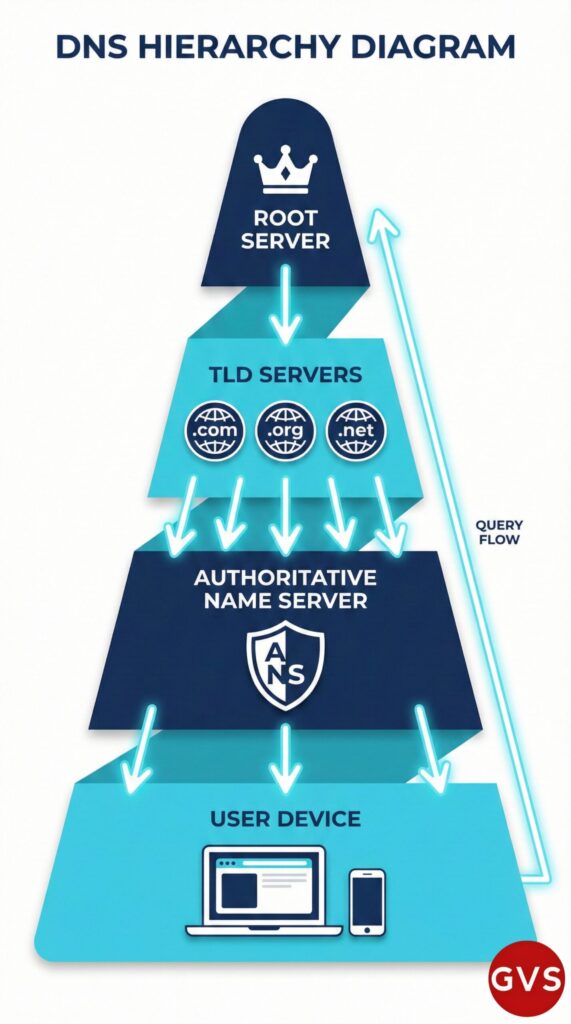
But here’s where it gets interesting – not all DNS servers do the same job. There’s actually a sophisticated hierarchy at work here, and understanding it will give you real insight into what is DNS server functionality.
The Main Types of DNS Servers
1. Recursive Resolver (DNS Resolver)
This is the server your device talks to first. The DNS recursor is a server designed to receive queries from client machines through applications such as web browsers. Your Internet Service Provider (ISP) typically runs these servers, though you can also use public ones like Google DNS (8.8.8.8) or Cloudflare DNS (1.1.1.1).
2. Root Name Servers
These are the top dogs of the DNS world. The Domain Name System has been an essential component of the functionality of the Internet since 1985, and root servers have been there from the beginning. There are only 13 root server IP addresses worldwide (though many more physical servers), and they direct queries to the appropriate Top-Level Domain servers.
3. TLD Name Servers
TLD stands for Top-Level Domain. These servers manage all the domain names that share a common extension like .com, .org, .net, or country codes like .uk or .in. The TLD server hosts the last portion of a hostname.
4. Authoritative Name Servers
This is where the actual answer lives. An authoritative nameserver is what gives you the real answer to your DNS query. These servers hold the actual IP address information for specific domains and provide the final answer to DNS queries.
How Does DNS Work? The Complete Step-by-Step Process
Alright, here’s where things get really fascinating. Understanding what is DNS and how does it work requires us to follow a query’s journey from your browser to the destination server and back. I promise to make this as simple as possible.
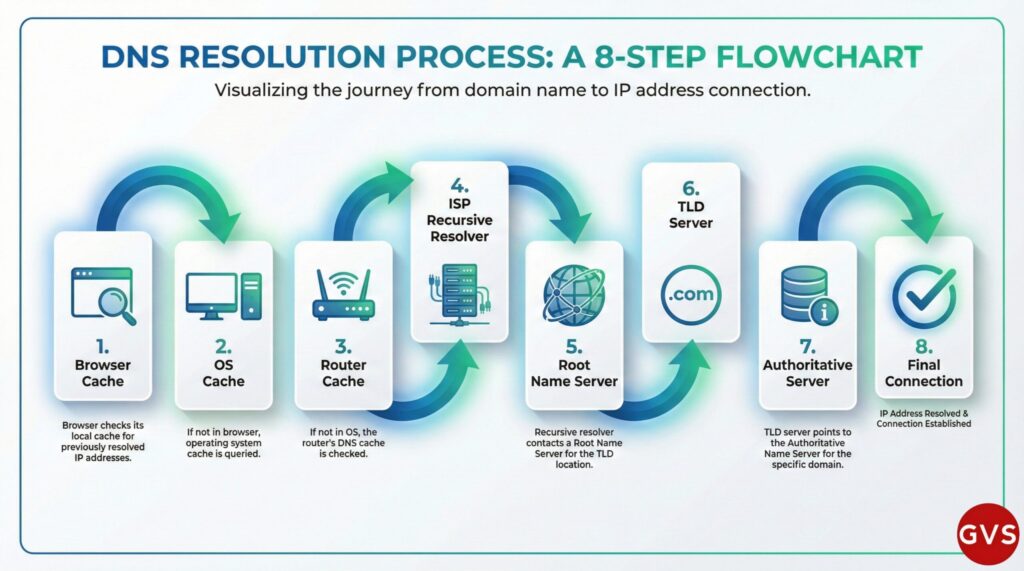
Let’s say you want to visit “youtube.com”. Here’s exactly what happens in those milliseconds:
Step 1: Browser Cache Check
Your browser first checks if it recently visited YouTube. Your computer searches its hosts file and cache for this information. If it finds the IP address stored locally, boom – instant connection! No need to ask anyone else.
Step 2: Operating System Cache
If the browser doesn’t have it, your operating system (Windows, macOS, Android, etc.) checks its own cache. This is your computer’s memory of recent DNS lookups.
Step 3: Router Cache
Still no luck? Your home WiFi router has its own small DNS cache. It might have the answer if someone else in your household recently visited the same site.
Step 4: ISP’s Recursive Resolver
Now things leave your local network. The query goes to your DNS resolver – typically operated by your ISP. This server has one job: find the answer, no matter how many other servers it needs to contact.
Step 5: Root Name Server Query
If the recursive resolver doesn’t have the answer cached, the query then goes to a recursive DNS server, also known as a recursive resolver. The root server responds with, “I don’t know YouTube’s exact address, but I know who handles all .com domains.”
Step 6: TLD Name Server
The resolver then contacts the .com TLD server, which says, “I don’t have YouTube’s IP, but I know which authoritative server does. Go ask them.”
Step 7: Authoritative Name Server
Finally! The authoritative server for youtube.com has the actual IP address. It sends back something like “142.250.193.78”.
Step 8: Response Returns
The IP address travels back through all these steps – to the recursive resolver, then to your router, then to your computer, and finally to your browser. Your browser can now connect directly to YouTube’s server using that IP address.

The mind-blowing part? This entire process takes just milliseconds. I still remember being amazed when I first learned this – all these conversations happening between servers across the globe, and we don’t even notice!
What are DNS Records? Complete Breakdown
Understanding what is DNS records is crucial if you want to grasp how DNS really works. Think of DNS records as different types of information stored in the DNS database. Each record type serves a specific purpose.
Let me break down the most important ones for you:
A Record (Address Record)
A records map a domain name to one or multiple IPv4 address(es). This is the most common and fundamental DNS record type. For example, when you type “example.com,” the A record tells your computer that example.com points to 93.184.216.34 (an IPv4 address).
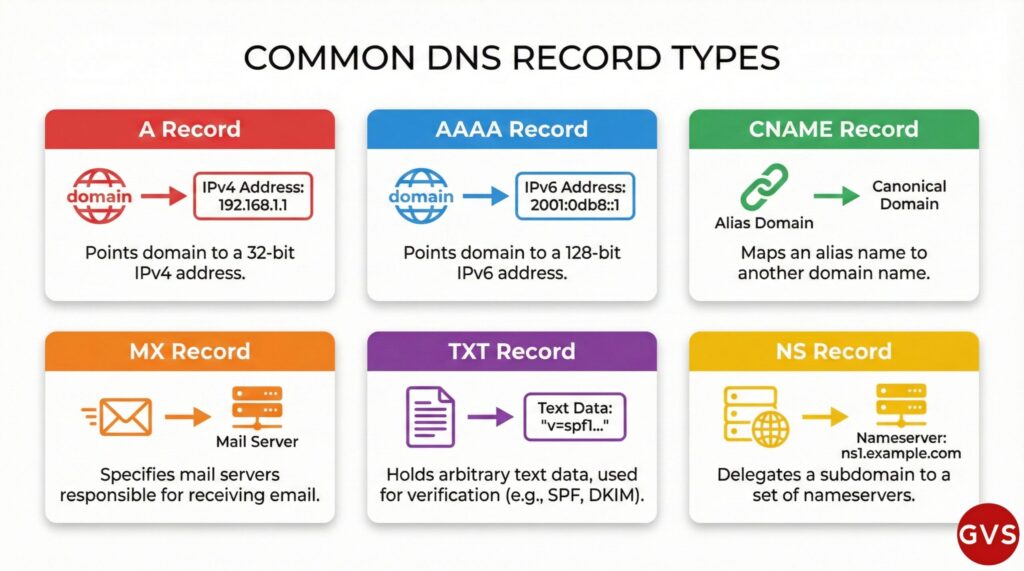
AAAA Record (Quad-A Record)
AAAA records serve a similar purpose to A records but are used for mapping domain names to IPv6 addresses rather than IPv4. As we transition to IPv6, these records are becoming increasingly important. IPv6 addresses look like this: 2606:2800:21f:cb07:6820:80da:af6b:8b2c.
CNAME Record (Canonical Name)
CNAME records are used to map an alias or subdomain to another domain name. Instead of pointing directly to an IP address, a CNAME points to another domain. This is super useful when you want multiple subdomains to point to the same destination.
For instance, you might have blog.example.com and www.example.com both pointing to example.com using CNAME records.
MX Record (Mail Exchange)
MX record directs mail to an email server. These records are crucial for email delivery. They tell email servers where to send emails for your domain. Without proper MX records, you won’t receive emails!
TXT Record (Text Record)
TXT record lets an admin store text notes in the record, often used for email security. These are incredibly versatile and commonly used for domain verification, email security (SPF, DKIM, DMARC), and other purposes.
NS Record (Name Server)
NS record stores the name server for a DNS entry. These records specify which servers are authoritative for your domain. They’re essential for the DNS hierarchy to function properly.
Common DNS Record Types Comparison
| Record Type | Purpose | Example | Common Use |
|---|---|---|---|
| A | Maps domain to IPv4 address | example.com → 93.184.216.34 | Website hosting |
| AAAA | Maps domain to IPv6 address | example.com → 2606:2800:220:1:248 | Modern IPv6 hosting |
| CNAME | Creates alias to another domain | www.example.com → example.com | Subdomain redirection |
| MX | Directs email traffic | example.com → mail.example.com | Email delivery |
| TXT | Stores text information | v=spf1 include:_spf.google.com | Verification, email security |
| NS | Specifies authoritative servers | example.com → ns1.nameserver.com | DNS delegation |
DNS in Computer Networks: The Backbone of Communication
When we talk about what is DNS in computer network, we’re really discussing how computers communicate with each other across the internet. Let me share something that really drove this home for me.
I once worked with a small business that was experiencing intermittent connectivity issues. After investigation, we discovered their internal DNS was misconfigured. The moment we fixed it, everything – from their email to their cloud applications – started working smoothly again. That’s when it hit me: DNS is absolutely fundamental to network operations.
DNS in Network Architecture
DNS is essential for Active Directory Domain Services (AD DS), serving as the domain controller location mechanism for operations like authentication, updates, and searches. In enterprise networks, DNS does far more than just resolve website names.
In a typical corporate network:
- Internal DNS servers manage private domain names that aren’t accessible from the internet
- Split-horizon DNS provides different answers to internal vs. external queries
- DNS load balancing distributes traffic across multiple servers
- Failover mechanisms ensure high availability even if one DNS server goes down
A recursive DNS service acts like a hotel concierge: while it doesn’t own any DNS records, it acts as an intermediary who can get the DNS information on your behalf. This perfectly captures how DNS servers work together in networks.
Understanding DNS Lookup Process
You’ve probably heard the term DNS lookup thrown around, but what is DNS lookup exactly? In simple terms, it’s the process of querying DNS servers to find the IP address associated with a domain name.
DNS Lookup, also called DNS Resolution, is the process of translating a human-readable domain name into its corresponding IP address.
Types of DNS Queries
Not all DNS lookups are created equal. There are actually three types of queries that can occur:
1. Recursive Query
In this query, if the resolver is unable to find the record, the DNS client wants the DNS Server to respond with either the requested source record or an error message. This is the most common type of query your devices make. The DNS resolver takes full responsibility for getting you an answer.
2. Iterative Query
In an iterative situation, the DNS client will allow a DNS server to return the best answer it can. If the server doesn’t know the answer, it provides a referral to another server. The client then queries that server, and the process continues until it gets an answer.
3. Non-Recursive Query
Nonrecursive queries are for which the recursive resolver server already knows where to get the answer. This happens when the answer is already cached, making the lookup incredibly fast.
What is DNS Resolver? Your Gateway to the Internet
The DNS resolver is perhaps one of the most important components in the entire DNS system, yet most people have never heard of it. Let me explain what is DNS resolver in a way that makes sense.
Imagine you’re planning a trip to a foreign country. You could spend hours researching flights, hotels, activities, and restaurants. Or, you could hire a travel agent who does all that research for you and comes back with a complete itinerary. The DNS resolver is your internet’s travel agent.
Clients typically do not make queries directly to authoritative DNS services. Instead, they generally connect to another type of DNS service known as a resolver.
How DNS Resolvers Work
When you type a website address, your device sends the request to a DNS resolver (also called a recursive resolver). This resolver then:
- Checks its own cache first (maybe it recently looked up this domain)
- If not cached, contacts the root servers
- Then contacts the TLD servers
- Finally contacts the authoritative servers
- Returns the IP address to your device
- Caches the result for future queries
The DNS resolver also caches the IP address for example.com for an amount of time that you specify so that it can respond more quickly the next time someone browses to example.com.
Popular Public DNS Resolvers
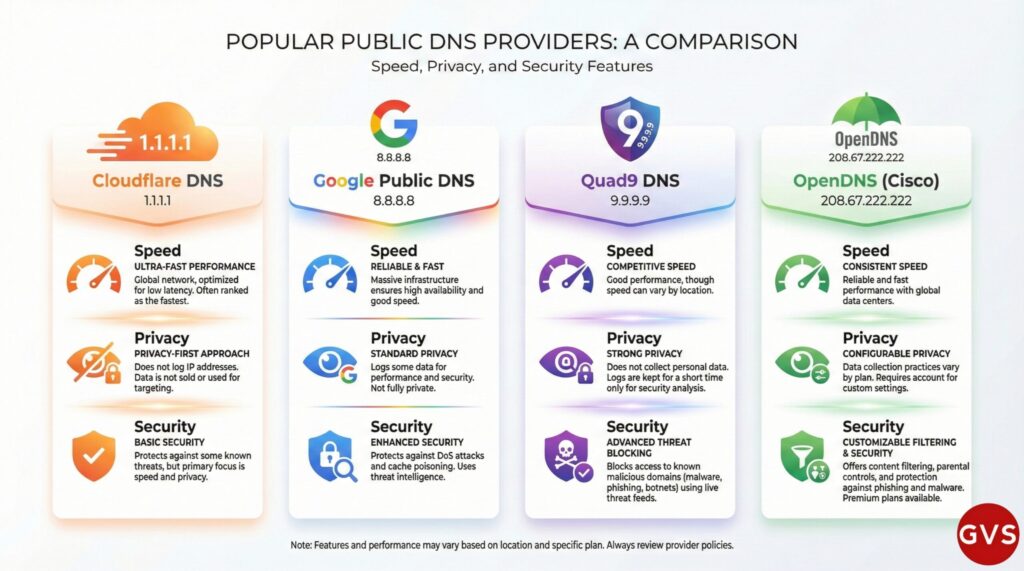
While your ISP provides a default DNS resolver, you’re free to use any public resolver you prefer:
- Google Public DNS: 8.8.8.8 and 8.8.4.4
- Cloudflare DNS: 1.1.1.1 and 1.0.0.1 (known for privacy focus)
- Quad9: 9.9.9.9 (includes malware blocking)
- OpenDNS: 208.67.222.222 and 208.67.220.220
I personally switched to Cloudflare DNS a couple of years ago and noticed a slight improvement in browsing speed. Your mileage may vary, but it’s worth experimenting!
DNS Resolution Explained: The Journey of a Query
We’ve touched on this throughout the article, but let’s specifically focus on what is DNS resolution. It’s the complete process of converting a domain name into an IP address, and it’s honestly one of the most elegant systems in computing.
The basic process of DNS resolution follows these steps: The user enters a web address or domain name into a browser. The browser sends a recursive DNS query message to the network.
The Two Types of DNS Resolution
Forward DNS Resolution
This is what we’ve been discussing – converting a domain name (like google.com) into an IP address (like 142.250.193.78). This is by far the most common type of DNS resolution and happens millions of times per second globally.
Reverse DNS Resolution
This works in the opposite direction – converting an IP address back into a domain name. PTR records enable reverse DNS lookups, aiding in network diagnostics and security measures. This is particularly useful for email servers and security systems.
Caching: The Secret to DNS Speed
Here’s something that fascinates me about DNS: caching happens at multiple levels. The purpose of caching is to temporarily store data in a location that results in improvements in performance and reliability for data requests.
Think about it – if every single DNS query had to go through all those steps we discussed, the internet would be noticeably slower. But because of intelligent caching at the browser, OS, router, and resolver levels, most queries get answered in microseconds from cached data.
DNS Security Threats: Understanding Spoofing, Hijacking, and More
Now we need to talk about something serious: what is DNS spoofing and other DNS security threats. As someone who’s dealt with security incidents, I can tell you that DNS attacks are no joke.
In a 2023 IDC study, 88% of organisations have experienced one or more DNS attacks on their network, with an average of seven per year and each successful attack costs the business, on average, $942,000. Those numbers should wake anyone up!

DNS Spoofing (Cache Poisoning)
What is DNS spoofing? It’s an attack where hackers inject false information into DNS caches. Domain Name System (DNS) poisoning happens when fake information is entered into the cache of a domain name server, resulting in DNS queries producing an incorrect reply, sending users to the wrong website.
Imagine this scenario: You type “bank.com” expecting to reach your bank’s website. But because of DNS spoofing, you’re redirected to a fake website that looks identical to your bank’s site. You enter your credentials, and boom – hackers now have access to your account. Scary, right?
DNS Hijacking
DNS hijacking, also known as domain theft, is a type of attack that involves maliciously gaining control of a domain name. This is even more serious than spoofing because attackers actually take control of legitimate DNS records.
In a study from Palo Alto Networks’s Unit 42, researchers analyzed 29 billion new DNS records from March to September 2024. The researchers flagged 6,729 of these records as DNS hijacking, which is an average of 38 DNS hijack records per day.
DNS Tunneling
DNS tunneling is a type of attack that involves using the DNS protocol to bypass firewalls and exfiltrate data from a compromised network. Attackers use this technique to sneak data out of networks by hiding it inside DNS queries, which often pass through firewalls undetected.
DNS Amplification Attacks
DNS amplification works by exploiting open resolvers to flood a target server with traffic. In Q1 of 2024 alone, there were 1.5 million DNS DDoS attacks. These attacks can bring down websites and services by overwhelming them with traffic.
Protecting Against DNS Threats
So how do we protect ourselves? Here are the key measures:
- DNSSEC (DNS Security Extensions): DNSSEC enhances DNS security by allowing DNS data to be verified using digital signatures
- DNS over HTTPS (DoH): Encrypts DNS queries to prevent eavesdropping and manipulation
- DNS over TLS (DoT): Similar to DoH but uses a different protocol
- Regular DNS cache flushing: Clears potentially poisoned cache entries
- Using reputable DNS providers: Stick with well-known, secure DNS services
- Monitoring DNS traffic: Watch for suspicious patterns and anomalies
The 4 Types of DNS Servers: A Detailed Breakdown
Earlier we discussed DNS server types, but let’s specifically answer the question: What are the 4 types of DNS?
The four main types of DNS servers work together in a hierarchical system:
1. DNS Recursive Resolver
This is the first server your device contacts. The DNS recursor receives the query from the DNS client, then makes additional requests to satisfy the client’s DNS query. It’s the workhorse that does all the legwork for you.
Think of it as: Your personal assistant who will contact whoever necessary to get you an answer.
2. Root Name Server
The root server is the first step in translating human readable host names into IP addresses. It can be thought of like an index in a library that points to different racks of books.
Think of it as: The main information desk at a massive library that directs you to the right section.
3. TLD Name Server
The top level domain server can be thought of as a specific rack of books in a library. This nameserver is the next step in the search for a specific IP address.
Think of it as: The section librarian who knows all about books in their specific category.
4. Authoritative Name Server
An authoritative nameserver is what gives you the real answer to your DNS query. This server has the actual records for the domain you’re looking for.
Think of it as: The specific book you were looking for – it contains the exact information you need.
Can Internet Work Without DNS? The Reality Check
Here’s a question I get asked surprisingly often: Can internet work without DNS? The technical answer is yes, but the practical answer is absolutely not in any meaningful way.
Let me explain. The internet itself is based on IP addresses, not domain names. Theoretically, you could browse the entire internet using only IP addresses. Try it right now – type 142.250.193.78 into your browser. You’ll reach Google!
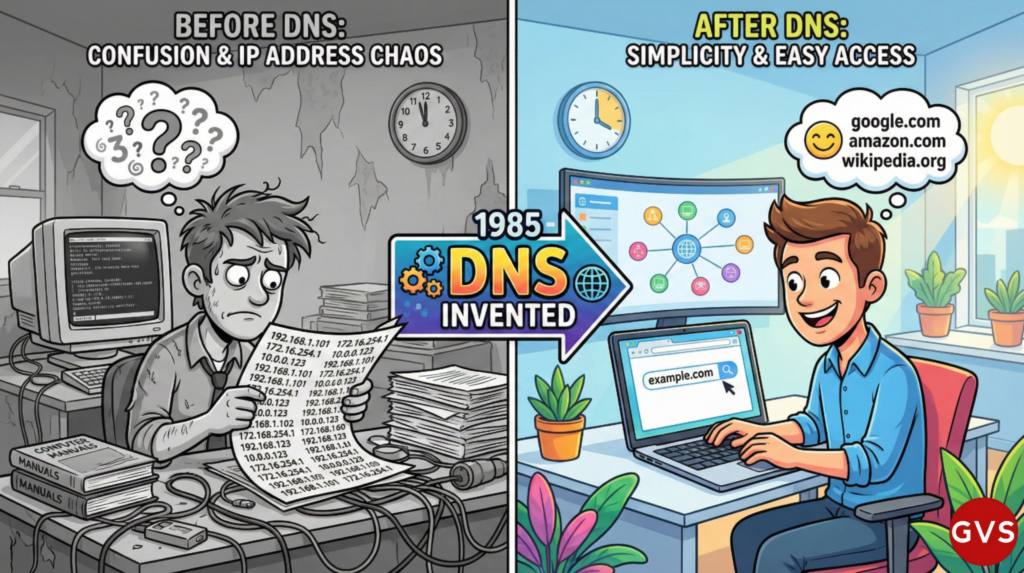
But here’s why this is completely impractical:
- Memory burden: There are currently more than 342 million registered domains. Imagine trying to remember even a dozen IP addresses!
- Dynamic IPs: Many websites use multiple IP addresses or change them frequently for load balancing and redundancy
- Virtual hosting: One IP address can host hundreds of different websites
- Email would break: Email relies heavily on MX records and domain names
- SSL/TLS certificates: Modern security depends on domain names, not IP addresses
When I explain this to people, I like to use this analogy: Sure, you could navigate a city using only GPS coordinates instead of street names. But would you really want to tell your friends, “Meet me at 40.7128° N, 74.0060° W” instead of “Meet me at Times Square”?
Without DNS servers, the internet would shut down very quickly. DNS isn’t just a convenience – it’s an absolute necessity for the modern internet.
How to Fix DNS Problems: Practical Solutions
Now for the really practical stuff: How do I fix my DNS problem? I’ve troubleshot countless DNS issues over the years, and I’m going to share the most effective solutions with you.
Common DNS Problems You Might Face
- Websites not loading while internet connection is active
- “DNS server not responding” error messages
- Slow website loading times
- Intermittent connectivity issues
- Email delivery problems
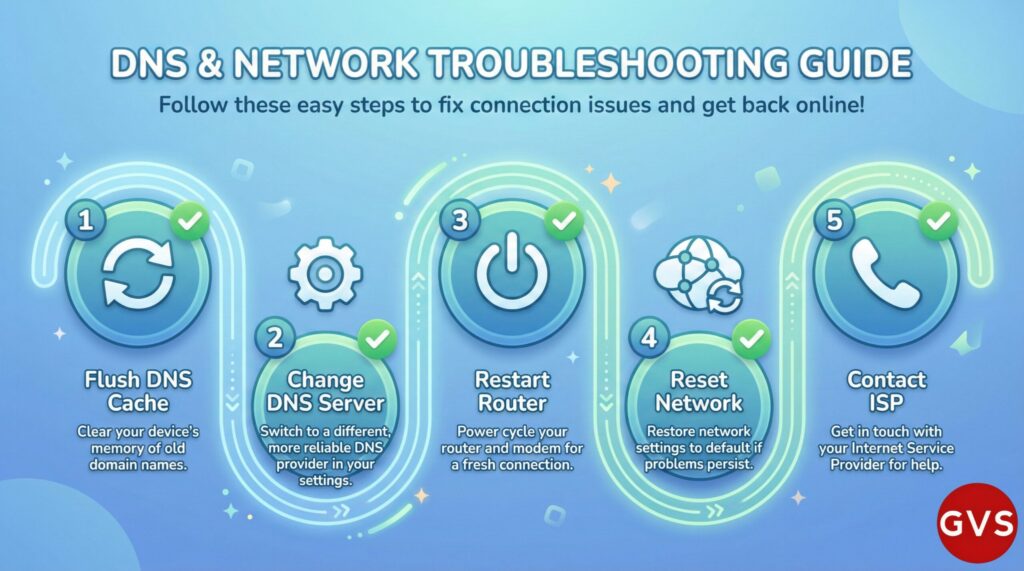
Step-by-Step DNS Troubleshooting Guide
1. Flush Your DNS Cache
This is usually the first and easiest fix. It clears out potentially corrupted or outdated DNS entries.
For Windows:
- Open Command Prompt as Administrator
- Type:
ipconfig /flushdns - Press Enter
For Mac:
- Open Terminal
- Type:
sudo dscacheutil -flushcache; sudo killall -HUP mDNSResponder - Enter your password when prompted
For Linux:
- Open Terminal
- Type:
sudo systemd-resolve --flush-caches
2. Change Your DNS Servers
Sometimes your ISP’s DNS servers are slow or experiencing issues. Switching to a public DNS can solve many problems.
I recommend trying these reliable options:
- Cloudflare: 1.1.1.1 and 1.0.0.1
- Google: 8.8.8.8 and 8.8.4.4
- Quad9: 9.9.9.9 and 149.112.112.112
To change DNS on Windows:
- Go to Control Panel → Network and Internet → Network Connections
- Right-click your connection → Properties
- Select Internet Protocol Version 4 (TCP/IPv4)
- Click Properties
- Select “Use the following DNS server addresses”
- Enter your preferred DNS addresses
- Click OK
3. Restart Your Router
I know it sounds too simple, but you’d be amazed how often this works. Unplug your router, wait 30 seconds, then plug it back in. This clears the router’s DNS cache and can resolve many connectivity issues.
4. Reset Your Network Settings
If the above steps don’t work, try resetting your network settings completely. On Windows, you can use:
netsh winsock reset
followed by
netsh int ip reset
5. Check for Malware
Sometimes DNS problems are caused by malware that hijacks your DNS settings. Run a full system scan with updated antivirus software.
6. Disable VPN/Proxy
VPNs and proxies can sometimes interfere with DNS resolution. Try temporarily disabling them to see if that solves the problem.
7. Update Network Drivers
Outdated network drivers can cause DNS problems. Check your device manufacturer’s website for the latest drivers.
8. Contact Your ISP
If nothing else works, the problem might be on your ISP’s end. Give them a call – they might be experiencing DNS server issues.
Preventing Future DNS Problems
Here are some proactive measures I always recommend:
- Use reliable, fast DNS servers (don’t just stick with your ISP’s default)
- Keep your router firmware updated
- Regularly clear your DNS cache
- Use DNS over HTTPS for added security
- Monitor your network for unusual DNS queries
- Implement DNSSEC if you manage your own domain
Frequently Asked Questions About DNS
What is the DNS?
The DNS (Domain Name System) is a hierarchical, decentralized naming system that translates human-readable domain names (like google.com) into machine-readable IP addresses (like 142.250.193.78). It’s essentially the internet’s phonebook, making it possible for us to access websites using easy-to-remember names instead of complicated numerical addresses.
What is a DNS answer?
A DNS answer is the response you get from a DNS server when you query it for information about a domain. The answer typically contains the IP address associated with the domain name you requested, along with additional information like the TTL (Time To Live) value, which tells your system how long to cache this information. DNS answers can be authoritative (coming directly from the domain’s name servers) or non-authoritative (coming from a cached copy).
What is DNS and its types?
DNS (Domain Name System) has several types of components and records. The main server types include: Recursive Resolvers, Root Name Servers, TLD Name Servers, and Authoritative Name Servers. The main record types include: A records (IPv4 addresses), AAAA records (IPv6 addresses), CNAME records (aliases), MX records (mail servers), TXT records (text information), NS records (name servers), SOA records (zone authority), and PTR records (reverse lookups).
What is DNS simply?
Simply put, DNS is the system that converts website names into IP addresses. When you type “facebook.com” into your browser, DNS figures out which computer on the internet is Facebook’s server and connects you to it. Without DNS, you’d have to memorize long strings of numbers for every website you want to visit.
What is the main purpose of DNS?
The main purpose of DNS is to make the internet user-friendly by translating domain names into IP addresses. This serves several critical functions: it allows us to use memorable names instead of numbers, enables websites to change their IP addresses without affecting users, supports email routing through MX records, provides load balancing across multiple servers, and forms the foundation for various internet services and security features.
What are the 4 types of DNS?
The 4 main types of DNS servers are: (1) Recursive Resolver – the first server that receives your query and does the work of finding the answer; (2) Root Name Server – directs queries to the appropriate TLD servers; (3) TLD Name Server – manages queries for specific top-level domains like .com, .org, or .net; and (4) Authoritative Name Server – provides the actual answer with the domain’s IP address. These four types work together in a hierarchy to resolve DNS queries.
Can Internet work without DNS?
Technically, yes – the internet can function without DNS since it’s based on IP addresses, not domain names. You could theoretically access websites using their IP addresses directly. However, practically speaking, the internet would be nearly unusable without DNS. You’d have to memorize hundreds of IP addresses, email wouldn’t work as we know it, security certificates would fail, and many modern web technologies would break. So while it’s technically possible, DNS is absolutely essential for the internet as we use it today.
How do I fix my DNS problem?
To fix DNS problems, try these steps in order: (1) Flush your DNS cache using commands like ipconfig /flushdns on Windows; (2) Change to public DNS servers like Cloudflare (1.1.1.1) or Google (8.8.8.8); (3) Restart your router by unplugging it for 30 seconds; (4) Reset your network settings; (5) Disable VPN or proxy temporarily; (6) Check for malware that might be hijacking DNS; (7) Update your network drivers; and (8) Contact your ISP if problems persist. Most DNS issues can be resolved with one of these steps.
Is DNS lookup the same as DNS resolution?
Yes, DNS lookup and DNS resolution essentially refer to the same process – the act of querying DNS servers to find the IP address associated with a domain name. However, “DNS resolution” typically refers to the complete process from start to finish, while “DNS lookup” might sometimes refer to a specific query within that process. In everyday usage, the terms are interchangeable.
Why is my DNS server not responding?
Your DNS server might not respond for several reasons: the DNS server is down or experiencing issues, your internet connection is unstable, your router needs to be restarted, firewall or antivirus software is blocking DNS queries, your network adapter needs updating, or there’s a problem with your network configuration. Start by flushing your DNS cache and restarting your router. If that doesn’t work, try changing to a different DNS server like Google DNS or Cloudflare DNS.
What’s the difference between DNS and IP address?
An IP address is a unique numerical identifier assigned to every device on the internet (like 192.168.1.1), while DNS is the system that translates human-readable domain names into these IP addresses. Think of it this way: the IP address is like a phone number, while DNS is like the contact list in your phone that converts names into numbers. You could use IP addresses directly, but DNS makes the internet much more user-friendly.
Conclusion: The Invisible Foundation of Our Digital World
As we’ve explored throughout this comprehensive guide, DNS is far more than just a technical protocol – it’s the invisible foundation that makes our entire digital experience possible. From the moment you wake up and check your email to late-night browsing sessions, DNS is working tirelessly behind the scenes, translating billions of requests every single day.
Understanding what is DNS and how does it work isn’t just about satisfying technical curiosity. It’s about appreciating one of the internet’s most critical systems and knowing how to troubleshoot when things go wrong. Whether you’re experiencing slow browsing speeds, concerned about DNS security, or just want to optimize your internet experience, the knowledge you’ve gained here will serve you well.
I’ve been fascinated by DNS for years, and I hope this guide has helped demystify this incredible system for you. The next time you type a website address and it loads instantly, you’ll know about the amazing choreography of servers working together to make that happen.
Remember these key takeaways:
- DNS translates domain names into IP addresses, making the internet user-friendly
- Multiple types of DNS servers work together in a hierarchical system
- DNS security is crucial – protect yourself with DNSSEC and DNS over HTTPS
- Public DNS servers like Cloudflare (1.1.1.1) and Google (8.8.8.8) can improve speed and security
- Most DNS problems can be fixed by flushing cache, changing servers, or restarting equipment
- Understanding DNS helps you troubleshoot internet issues more effectively
The internet is constantly evolving, and so is DNS. New protocols like DNS over HTTPS and DNSSEC are making it more secure, while technologies like EDNS are making it more efficient. By understanding these fundamentals, you’re better equipped to navigate our increasingly connected world.
What’s your experience with DNS? Have you ever had to troubleshoot DNS issues, or are you considering switching to a different DNS provider? I’d love to hear your thoughts and experiences in the comments below!
Stay curious, stay connected, and remember – every time you browse the internet, you’re witnessing one of computing’s most elegant systems in action.
Did you find this guide helpful? Share it with someone who’s curious about how the internet works! And if you have questions about DNS or any other networking topic, don’t hesitate to reach out. We’re all learning together in this digital age.