



AMD vs Intel Processors 2025 Which CPU is Better for You?

Understanding the AMD vs Intel Battle in 2025
Let me tell you something that’s been keeping me up at night—choosing between AMD and Intel processors isn’t as simple as it used to be. I remember when I built my first PC back in the day, the choice was pretty clear-cut. But now? Things have completely changed, and honestly, that’s exciting news for all of us!
The AMD vs Intel processor comparison has become one of the hottest debates in the tech world, especially in 2025. Whether you’re a hardcore gamer chasing every frame per second, a student on a budget trying to get the best bang for your buck, or a professional who needs reliable performance for demanding workloads, this decision matters more than ever.
What makes this comparison so fascinating is that both companies have been pushing boundaries like never before. AMD’s Ryzen processors have revolutionized the market with their incredible multi-core performance and competitive pricing, while Intel Core processors continue to dominate in single-threaded applications and maintain their reputation for reliability.
The processor you choose isn’t just about raw specifications—it’s about how well it fits your specific needs, your budget, and your future upgrade path.
Table of Contents
- AMD and Intel: Who Are They Really?
- Performance Comparison: Where Each Excels
- Gaming Performance: The Ultimate Showdown
- Price-to-Performance Ratio
- AMD vs Intel Processors for Laptops
- Best Processor for Students
- What Are the Downsides of AMD Processors?
- Is Ryzen 7 Equal to i5 or i7?
- Does AMD Last Longer Than Intel?
- Why Do People Still Prefer Intel?
- AMD vs Intel Comparison Chart 2025
- Frequently Asked Questions
- Final Verdict
AMD and Intel: Who Are They Really?
Intel Corporation: The Industry Pioneer
Founded way back in 1968, Intel has been the undisputed king of processors for decades. They’re the folks who’ve been powering computers from Apple, HP, Dell, and Lenovo for generations. Intel currently holds about 62% of the global desktop CPU market, and there’s a reason for that dominance.
Intel’s Core i3, i5, i7, and i9 series have become household names. Their latest innovations include the Arrow Lake processors and Core Ultra series, which integrate AI features and improved efficiency cores. Intel processors are known for their exceptional single-core performance, making them ideal for gaming and applications that rely heavily on clock speeds.
AMD: The Rising Challenger
AMD (Advanced Micro Devices), founded in 1969, spent years playing second fiddle to Intel. But everything changed with the launch of their Ryzen series in 2017. Using their revolutionary Zen architecture, AMD completely disrupted the market.
Today, AMD’s Ryzen processors—including the Ryzen 3, 5, 7, and 9 series—offer incredible value. Their latest Ryzen 9000 series based on Zen 5 architecture and the gaming-focused X3D processors with 3D V-Cache technology have set new standards. The Ryzen 7 9800X3D is currently the fastest gaming chip on the planet, delivering performance that’s 30-35% better than Intel’s competing flagship in many titles.
Performance Comparison: Where Each Excels
Single-Core Performance
When it comes to single-threaded tasks, Intel traditionally holds the advantage. Applications like web browsing, Microsoft Office, and older games that don’t utilize multiple cores benefit from Intel’s higher clock speeds. The Intel Core i9-14900K can boost up to 6.0 GHz, providing snappy responsiveness in everyday tasks.
However, AMD has closed this gap significantly. Their Ryzen 9000 series delivers competitive single-core performance, and for most real-world applications, you won’t notice a meaningful difference between the two brands anymore.
Multi-Core Performance
This is where AMD really shines. If you’re into video editing, 3D rendering, streaming while gaming, or running virtual machines, AMD’s higher core and thread counts give them a decisive edge. The Ryzen 9 9950X with its 16 cores and 32 threads absolutely crushes productivity workloads.
For content creators using applications like Adobe Premiere Pro, Blender, or DaVinci Resolve, AMD processors offer better value and performance. They handle parallel tasks more efficiently, which translates to faster render times and smoother multitasking.
Gaming Performance: The Ultimate Showdown
Here’s where things get really interesting, and I’ve got to be honest with you—AMD has taken the gaming crown in 2025.
🖥️ CPU Performance Comparison 2024-2025 📊
Gaming Performance (FPS)
CPU Efficiency (FPS/Watt)
CPU Value (FPS/$)
CPU Clock Speed (MHz)
Power Consumption (Watts)
AMD’s Gaming Dominance
AMD’s 3D V-Cache technology is a game-changer (pun intended). The Ryzen 7 9800X3D delivers frame rates that Intel simply can’t match. We’re talking about:
- 160 FPS in Baldur’s Gate 3 compared to 126 FPS on Intel’s previous champion
- 169 FPS in Starfield versus 145 FPS on the 7800X3D
- 30-35% higher performance than Intel’s Core Ultra 9 285K in CPU-intensive games
If you’re a competitive gamer playing titles like Valorant, CS2, or Warzone, the AMD Ryzen 7 9800X3D gives you that crucial edge. The massive cache ensures smoother frame times and higher minimum FPS, which is what actually matters when you’re in the heat of battle.
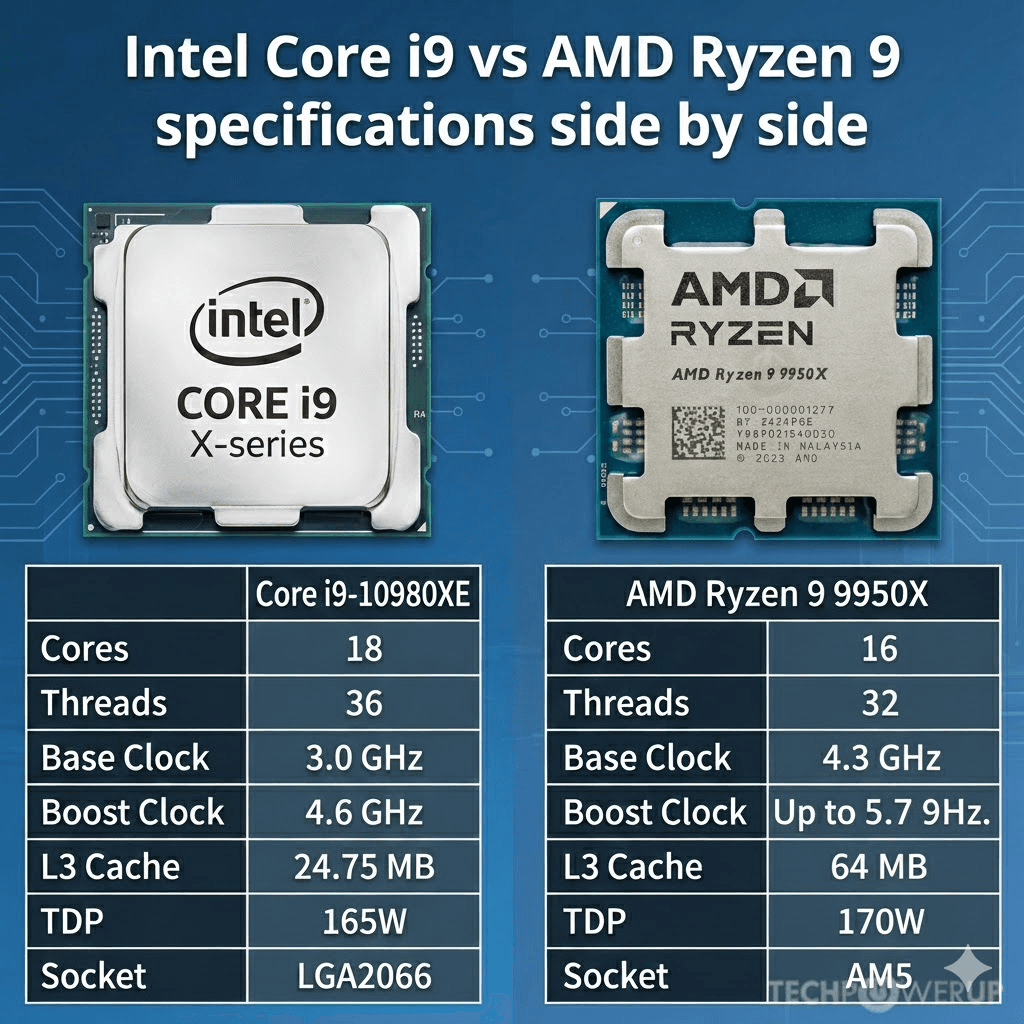
Intel’s Gaming Performance
Don’t write off Intel completely though! Their processors still perform excellently in gaming, especially in older DirectX 11 titles and games that favor high clock speeds over cache. The Core i9-14900K and Core i7-14700K deliver fantastic gaming experiences, and if you pair them with a high-end GPU like the RTX 5090, you’ll be more than satisfied.
Intel also excels in scenarios where you’re gaming and streaming simultaneously. The hybrid architecture with performance and efficiency cores handles background tasks better, making it ideal for content creators who stream their gameplay.
Price-to-Performance Ratio: Getting the Most for Your Money
Let’s talk money, because that’s what really matters when you’re making a purchase decision, right?
| Price Range | AMD Option | Intel Option | Winner |
|---|---|---|---|
| Budget ($70-150) | Ryzen 5 5600G ($130-150) | Core i3-13100F ($70-90) | Intel (better value) |
| Mid-Range ($200-350) | Ryzen 5 7600X ($299) | Core i5-13600K ($300-350) | AMD (better performance) |
| High-End ($400-600) | Ryzen 7 9800X3D ($480) | Core i9-14900K ($390-450) | AMD (gaming), Intel (productivity) |
| Enthusiast ($600+) | Ryzen 9 9950X ($650) | Core Ultra 9 285K ($590) | Depends on workload |
AMD consistently offers better price-to-performance ratios, especially in the mid-range segment. You typically get more cores for less money, and their processors often run cooler, saving you money on cooling solutions.
Intel processors tend to be priced slightly higher, but they justify this with stronger single-threaded performance and sometimes better integrated graphics. If you’re building a system without a discrete GPU, Intel’s Iris Xe graphics outperform AMD’s integrated solutions.
AMD vs Intel Processors for Laptops
The laptop market tells a slightly different story. Here, both companies have compelling offerings, but your choice depends heavily on what you value most.
AMD Ryzen for Laptops
AMD’s Ryzen mobile processors, especially the HS and U series, deliver excellent battery life and performance efficiency. They’re perfect for:
- Students who need all-day battery life
- Professionals who want powerful performance without constant charging
- Content creators working on the go
The Ryzen 7 and Ryzen 9 mobile chips offer fantastic multi-core performance at lower power consumption, which translates to longer battery life and cooler operation.
Intel for Laptops
Intel maintains a strong lead in high-end mobile gaming with their Core Ultra processors. The Core Ultra 9 285HX is the top choice for portable gaming powerhouses. Intel also dominates in:
- Business laptops where stability and compatibility matter most
- Ultrabooks requiring the best single-threaded performance
- Systems with Thunderbolt 4 requirements (Intel technology)
Best Processor for Students: AMD or Intel?
As someone who’s helped dozens of students choose their laptops, I can tell you this: AMD is usually the better choice for students, and here’s why.
Students need a processor that can handle:
- Multitasking – Running multiple browser tabs, Word documents, and Spotify simultaneously
- Long battery life – Lasting through classes without constantly hunting for outlets
- Budget-friendly pricing – Getting the most performance per dollar
- Light content creation – Video projects, photo editing, coding
The AMD Ryzen 5 7600X or Ryzen 7 5700X offers incredible value for students. You get solid gaming performance for those late-night gaming sessions, excellent multitasking capabilities for research papers, and energy efficiency for all-day battery life.
However, if you’re a computer science or engineering student who needs specific Intel-optimized software, or if you require Thunderbolt connectivity for external devices, then Intel Core i5 or i7 processors might serve you better.
What Are the Downsides of AMD Processors?
Look, I love AMD processors, but I need to be honest with you about their limitations. No processor is perfect, and AMD has some genuine drawbacks you should know about:
1. Single-Core Performance Gap (Though Narrowing)
While AMD has improved dramatically, Intel still edges ahead in single-threaded tasks. If you’re running older software or games that rely heavily on single-core performance, you might notice Intel performing slightly better.
2. Higher Power Consumption Under Peak Load
When pushed to their limits, especially when overclocked, AMD processors can consume more power than Intel’s. This means you might need a more robust power supply and better cooling solutions. Some AMD chips can draw 120-142W under full load compared to Intel’s more efficient recent designs.
3. Lack of Integrated Graphics (On Some Models)
Many AMD processors don’t include integrated graphics, which means you must have a dedicated GPU. For budget builders who want to start with a CPU-only system and add a graphics card later, this is a significant limitation.
4. Software Optimization
Certain professional applications are still better optimized for Intel processors. Adobe Premiere Pro, for instance, has historically favored Intel’s architecture, though this gap has narrowed considerably.
5. Memory Compatibility (Early Ryzen Issues)
Earlier Ryzen generations had pickier memory compatibility, requiring specific RAM speeds and timings. While AMD has largely addressed this with newer generations, it’s something to consider if you’re buying older used systems.
Is Ryzen 7 Equal to i5 or i7?
This is one of the most common questions I get, and the answer is: It depends on which generation you’re comparing.
The Confusing Reality
AMD’s naming scheme doesn’t directly correspond to Intel’s. Here’s the breakdown:
| AMD Processor | Intel Equivalent | Use Case |
|---|---|---|
| Ryzen 7 9800X3D | Core i9-14900K | High-end gaming & content creation |
| Ryzen 7 7700X | Core i7-14700K | Balanced gaming & productivity |
| Ryzen 7 5800X | Core i5-12600K / i7-11700K | Mid-to-high range performance |
Generally speaking, a Ryzen 7 processor sits between Intel’s i5 and i7 in terms of both price and performance, but often outperforms them in multi-threaded workloads. For gaming specifically, the Ryzen 7 X3D variants actually compete with Intel’s i9 series.
The Ryzen 7 9800X3D, for example, delivers gaming performance that surpasses even Intel’s flagship processors, while the standard Ryzen 7 models offer excellent value compared to Core i7 chips.
Does AMD Last Longer Than Intel?
Here’s the truth that might surprise you: Both AMD and Intel processors are incredibly durable, and the brand isn’t what determines longevity.
The Real Story on CPU Lifespan
I’ve been building and maintaining PCs for over a decade, and here’s what I’ve learned: CPUs rarely fail. What actually fails are other components:
- Motherboards (especially due to capacitor aging)
- Power supplies
- RAM modules
- Cooling solutions
Both AMD and Intel processors can easily last 10+ years if properly cooled and maintained. The limiting factor isn’t the CPU dying—it’s the CPU becoming obsolete as software demands increase.
Upgrade Path Longevity
Here’s where AMD has a significant advantage: platform longevity. AMD’s AM4 socket supported five generations of Ryzen processors, meaning you could upgrade from a Ryzen 1000 series to a Ryzen 5000 series without changing your motherboard.
Intel, unfortunately, changes sockets more frequently. Their LGA 1700 socket only lasted two generations before moving to LGA 1851 with Arrow Lake. This means Intel users often need to replace both the CPU and motherboard when upgrading.
AMD has promised to support the AM5 socket until at least 2027, giving users a longer upgrade runway. From a long-term investment perspective, AMD platforms offer better longevity for your motherboard investment.
Why Do People Still Prefer Intel Over AMD?
Despite AMD’s impressive performance gains, Intel still holds 62% of the desktop CPU market. So what’s going on? Why do people—including some tech-savvy users—still choose Intel?
1. Brand Recognition and Trust
Let’s be real: Intel has been the gold standard for decades. Many businesses, IT departments, and even gamers stick with Intel simply because “it’s what we know.” This brand loyalty is powerful, especially in enterprise environments where change requires extensive validation.
2. Software Optimization
Certain professional applications and workflows are still better optimized for Intel. If you’re using specialized software that was designed primarily for Intel processors, you might see better stability and performance sticking with Intel.
3. Integrated Graphics
Intel’s Iris Xe integrated graphics are significantly better than AMD’s basic integrated solutions (when AMD includes them at all). For users building systems without discrete GPUs, this matters tremendously.
4. Thunderbolt and Platform Features
Thunderbolt technology is an Intel creation, and while AMD motherboards are starting to support it, Intel systems have better native Thunderbolt implementation. If you rely on Thunderbolt docks or high-speed external storage, Intel remains the safer choice.
5. Overclocking Headroom
Intel’s K-series processors offer more overclocking potential than AMD’s chips. Enthusiasts who want to push their systems to the absolute limit often prefer Intel’s greater frequency headroom.
6. Perceived Stability
Fairly or unfairly, Intel has a reputation for “rock-solid stability.” While modern AMD processors are equally stable, this perception persists in conservative buyer segments like enterprises and workstation users.
AMD vs Intel Comparison Chart 2025
| Feature | AMD Ryzen | Intel Core |
|---|---|---|
| Gaming Performance | Excellent (X3D models dominate) | Very Good (strong in older titles) |
| Multi-Core Performance | Exceptional (more cores per dollar) | Very Good (improving with hybrid arch) |
| Single-Core Performance | Very Good (closing the gap) | Excellent (slight edge) |
| Price-to-Performance | Better value overall | More expensive typically |
| Power Efficiency | Excellent (7nm/5nm process) | Very Good (improved with recent gens) |
| Integrated Graphics | Good (on APUs only) | Better (Iris Xe on most models) |
| Platform Longevity | Excellent (AM5 until 2027+) | Fair (frequent socket changes) |
| Overclocking Potential | Good (all Ryzen CPUs unlocked) | Excellent (K-series have more headroom) |
| Cooler Included | Yes (decent quality) | Sometimes (basic quality) |
| Market Share | 38% (growing rapidly) | 62% (still dominant) |
Frequently Asked Questions
Q1: Which is better for gaming in 2025, AMD or Intel?
AMD is currently better for pure gaming performance, especially their X3D processors like the Ryzen 7 9800X3D. These chips deliver 30-35% higher frame rates than Intel’s competing flagship in many modern games. However, Intel processors still offer excellent gaming performance, particularly in older titles and when paired with high-end GPUs. If you also stream or create content while gaming, Intel’s hybrid architecture might serve you better.
Q2: Is AMD better than Intel for laptops?
It depends on your priorities. AMD Ryzen mobile processors offer better battery life and multi-core performance, making them ideal for students and professionals who need all-day computing. Intel excels in high-performance gaming laptops and ultrabooks where single-threaded performance matters. For general use and value, AMD is often the better choice. For premium gaming laptops, Intel’s Core Ultra processors have an edge.
Q3: Why is AMD cheaper than Intel?
AMD isn’t always cheaper—their flagship processors can match or exceed Intel’s pricing. However, AMD generally offers better price-to-performance ratios because they provide more cores and threads at each price point. AMD’s aggressive pricing strategy is also designed to gain market share from Intel’s dominant position. They’ve proven their processors are competitive, so they price them attractively to win customers.
Q4: Do AMD processors run hotter than Intel?
This used to be true, but modern AMD processors actually run cooler than many Intel chips. AMD’s Zen 4 and Zen 5 architectures on 7nm/5nm processes are very power-efficient. Intel’s recent high-end processors, particularly the 13th and 14th gen i9 models, can actually run hotter and consume more power than their AMD equivalents. Both brands require good cooling solutions for high-end processors.
Q5: Can I upgrade from Intel to AMD (or vice versa) easily?
No, you cannot simply swap an Intel CPU for an AMD CPU. They use completely different sockets and chipsets, which means you’d need to replace your motherboard (and potentially RAM if moving between DDR4 and DDR5 platforms). This makes your initial CPU choice more important, though within each brand, AMD generally offers better upgrade paths without changing motherboards.
Q6: Which processor is better for video editing and content creation?
AMD Ryzen processors are generally better for content creation because they offer more cores and threads at competitive prices. The Ryzen 9 9950X with 16 cores and 32 threads crushes video rendering tasks. However, some Adobe applications still favor Intel processors slightly. For most creators, AMD provides better value and performance.
Q7: Are AMD processors good for programming and software development?
Yes, AMD processors are excellent for programming. Their multi-core performance helps with compilation times, running virtual machines, and multitasking between development environments. However, if your development workflow involves Intel-specific tools or requires maximum single-threaded performance, Intel might be preferable. For most developers, AMD offers better value.
Final Verdict: AMD vs Intel in 2025
So after all this, what’s the answer? Well, here’s what I genuinely believe: There is no single “better” processor—it depends entirely on your specific needs.
Choose AMD if:
- Gaming is your top priority and you want the absolute best frame rates
- You need strong multi-core performance for content creation, video editing, or 3D rendering
- You’re looking for the best price-to-performance ratio
- You want a platform with longer upgrade paths (AM5 socket)
- Power efficiency and cooler operation matter to you
- You’re a student or professional on a budget who needs solid performance
Choose Intel if:
- You use software that’s specifically optimized for Intel processors
- You need the best integrated graphics (without a discrete GPU)
- Thunderbolt connectivity is essential for your workflow
- You’re building a business or enterprise system where stability and compatibility are paramount
- You want maximum overclocking headroom
- You prefer the brand you’ve trusted for years
Personally, if I were building a system today for pure gaming, I’d go with the AMD Ryzen 7 9800X3D without hesitation. For content creation on a budget, the Ryzen 9 9950X offers unbeatable value. But if I needed a reliable workhorse for professional applications with excellent single-threaded performance, I’d seriously consider Intel’s Core i7-14700K.
The beauty of 2025 is that you really can’t go wrong with either choice. Both AMD and Intel are producing fantastic processors that’ll serve you well for years to come. The “processor war” has pushed both companies to innovate like never before, and we—the consumers—are the real winners.
Ready to build your dream PC? Take your time, consider your specific use case, check current prices, and remember: the best processor is the one that fits YOUR needs and budget. Don’t let anyone tell you otherwise!
Have questions about which processor is right for you? Drop them in the comments below, and let’s figure it out together. Happy building!